
Key Points
- Core — Enterprise networks are built from three zones and two layers of gatekeepers (firewalls). Reading them by device placement and traffic flow — not by memorizing terms — gives you a foundation for your own design calls.
- Who this is for — practitioners asked to make network design decisions (e.g., manufacturing IT) without being infrastructure specialists. No prior knowledge required.
- Portable takeaway — the zone map, the traffic-flow lens, and the VPN-vs-ZTNA / cloud-connectivity choices hold regardless of jurisdiction. The regulatory part below is US/EU-focused; regulation is where jurisdictions diverge most, and a few design inputs such as data residency and procurement can vary too. Building in or for Japan? The Japanese edition covers the Japan-specific frameworks.
- What's out of scope (for a specialist or the related posts) — protocol internals & physical layer / email security (SPF/DKIM/DMARC) / virtualization isolation (VM/container) / vendor product comparisons / case-by-case design judgments.
この記事の要点(日本語版はこちら)
- 本記事は 米国・EU の枠組みを背骨にした「国際版」 です(日本語版の翻訳ではなく、規制パートの対象法域が異なる対の記事。技術部分は法域に中立です)。
- 日本の制度(デジタル庁のゼロトラスト適用方針・ISMAP など)を主役にした内容は、日本語版 を参照してください。
Written: 2026-06 / Scope: the technology is jurisdiction-neutral; the regulatory part is US/EU-focused / last_updated: 2026-06-06 Changelog: 2026-06-06 first published as an international (US/EU) edition
This article is educational material, not design advice for a specific environment
This is a general explainer of how enterprise networks are put together — not design advice or a security audit for any specific system or organization. It does not guarantee the accuracy, completeness, or currency of its contents; product names, service names, and regulations change with rebrands and amendments. For real decisions about architecture, migration, or procurement, always consult your own infrastructure / security team, a qualified specialist, and each product's official documentation. All information is provided "AS IS." To the maximum extent permitted by law, the author and YATA-NODE accept no liability for any loss or damage arising from the use of or reliance on this article. Use it at your own risk.
About this series: this is the international edition of the entry point to YATA-NODE's "how things work" series. It maps enterprise networks end to end in a single piece. Going one layer deeper — how each path is protected and at which layer — is covered in communication security (no fixed cadence; revised as the field moves). For the rights and contract side, see the separate pre-ship rights checklist.
A few terms (for newcomers): the minimum vocabulary that recurs below.
- Zone: a segment of the network divided by trust level (internal / buffer / external, etc.).
- DMZ (De-Militarized Zone): a buffer segment, sandwiched between an outer and inner firewall, where servers exposed to the outside world live.
- Firewall (FW): a gatekeeper that permits or denies traffic, applying rules by IP, port, or application.
- Proxy: a device that relays traffic on behalf of others — a forward proxy consolidates employees' outbound traffic; a reverse proxy consolidates the entry point for inbound traffic.
- Gateway: a general term for a device that sits at an "entrance/exit" and relays, inspects, or controls traffic (e.g., a VPN gateway = the entry point from outside into the internal network).
- Software as a Service: software used over the network as a service rather than installed locally.See glossary → (Software as a Service): software used over the network as a service rather than installed locally.
- Domain Name System: translates domain names into IP addresses (the internet's address lookup).See glossary → (Domain Name System): translates domain names into IP addresses (the internet's address lookup).
- Database: a system for storing, searching, and managing data.See glossary → (database): a system for storing, searching, and managing data.
- Content Delivery Network: servers distributed worldwide that deliver content from a location near the user.See glossary → (Content Delivery Network): servers distributed worldwide that deliver content from a location near the user.
- Virtual Private Network: an encrypted tunnel over a public network for secure remote access to a private network.See glossary → (Virtual Private Network): an encrypted tunnel over a public network for secure remote access to a private network.
- Virtual LAN: logically segments a single physical network without changing the wiring.See glossary → (Virtual LAN): logically segments a single physical network without changing the wiring.
- Cross-Site Scripting: injecting malicious scripts into a web page so they run in a visitor's browser.See glossary → (Cross-Site Scripting): injecting malicious scripts into a web page so they run in a visitor's browser.
- Transport Layer Security: encrypts traffic; what `https://` relies on.See glossary → (Transport Layer Security): encrypts traffic; what
https://relies on. - Intrusion Prevention System: detects and automatically blocks malicious traffic.See glossary → (Intrusion Prevention System): detects and automatically blocks malicious traffic.
- Intrusion Detection System: detects and alerts on malicious traffic, without blocking.See glossary → (Intrusion Detection System): detects and alerts on malicious traffic, without blocking.
Network gear has an overwhelming number of names, but if you line everything up by "which zone, at which boundary does it sit, and what does it protect," you can place even an unfamiliar device. This article ① draws the map (three zones), ② places the main parts on it, ③ traces how real traffic flows, and ④ covers the move from perimeter to zero trust and how to pick a cloud connection — understanding by placement and flow, not by memorizing terms.
An enterprise network splits into three zones
A traditional enterprise network is divided into three zones of differing trust. Get this map into your head first, and every device that shows up later can be filed by "where it sits."
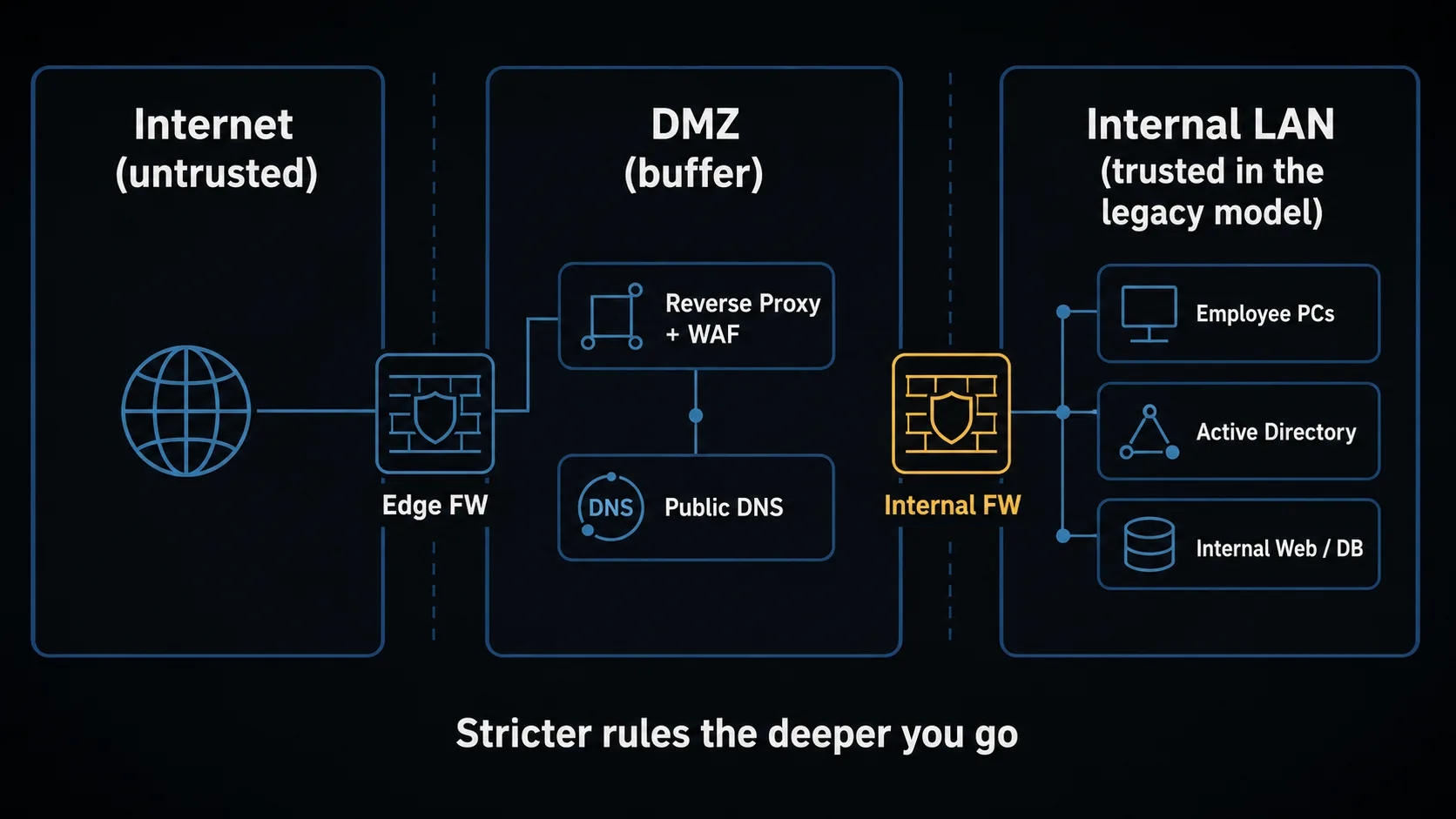
| Zone | What lives there | Trust |
|---|---|---|
| Internet | External users, cloud SaaS, attackers (all mixed) | Zero trust |
| DMZ (buffer) | Outward-facing Web / mail / DNS and other public servers | Neutral (firewalled on both sides) |
| Internal LAN | Employee PCs, auth servers, internal Web / DB / file servers | Trusted, in the legacy model |
At the boundaries of these three zones, gatekeepers (firewalls) stand in two layers. An Edge FW sits between Internet and DMZ; an Internal FW sits between DMZ and Internal LAN — and the deeper inward you go, the stricter the rules. Public-facing entry points (a reverse proxy, public DNS, etc.) go in the DMZ, while the real Web/app servers and important internal data are isolated further behind the Internal FW. That is the starting point of "defense in depth" (as Scenario B shows, a DMZ entry point relaying to an internal server is the common pattern).
'Trusted' does not mean 'safe'
The legacy model was built on the assumption that "the internal LAN is trustworthy." But once an attacker is inside, the damage spreads fast (lateral movement, ransomware). Rethinking that assumption is the zero-trust idea we cover later. First pin down the legacy map of "three zones + two firewalls," then move on to "how to reinforce that assumption."
The main parts — what, where, and what it protects
With the map drawn, you place the parts on it. The names are many, but the core set to know first is these nine. Read each row by "where it sits and what it protects."
| Part | What it does (one line) | Typical placement | Mainly protects against |
|---|---|---|---|
| Forward proxy (F-Proxy) | Centralizes employees' outbound traffic (URL filtering, log aggregation) | Internal LAN egress | Dangerous sites, data leaks, C&C traffic |
| Reverse proxy (R-Proxy) | Consolidates the entry point to internal Web apps (TLS termination, routing) | DMZ | Exposure of real server IPs, scattered TLS management |
| Firewall (FW) | Permits/denies traffic by IP / port / application | Zone boundary | Intrusion via unneeded ports, unauthorized access |
| WAF (a FW dedicated to Web apps) | Inspects HTTP content and blocks web attacks | In front of, or alongside, the R-Proxy | SQLi / XSS and other web-app attacks |
| DNS server (internal / external) | Name resolution (domain → IP); internal serves the LAN, external answers publicly | Internal LAN / DMZ・cloud | Malicious name redirection, exfiltration over DNS |
| Active Directory (AD) | Manages employee identity + authorization for resources | Internal LAN | Credential abuse, over-broad privileges |
| SSO + MFA (single sign-on + multi-factor auth) | One login across many services + two-or-more-factor identity check | IdP (identity provider) | Password reuse, impersonation |
| VPN | An encrypted tunnel from outside into the internal network | DMZ / cloud entry | Eavesdropping, spoofed connections |
| ZTNA (zero-trust network access) | Per-app, verify-every-time access (complements or replaces VPN by use case) | Cloud (broker) | Lateral movement after a VPN breach, over-broad exposure |
Beyond these there are parts that support availability, delivery, and routing (load balancers, DDoS protection, CDN, API gateways, routers / VLANs, IPS/IDS, and so on), but this article keeps to the core nine.
How to read the table: the role shifts as you move from the outer edge toward the inside (internal LAN / apps). At the edge you filter traffic (FW / WAF / proxy); inside you verify access (auth / ZTNA). The point is not to defend everything with one device, but to layer "who guards where" (defense in depth). In the next chapter we put these parts in motion by following how real traffic passes through them.
How real traffic flows (three scenarios)
Once you know where the parts sit, the last step is motion. Tracing three representative flows makes it click which checkpoint inspects what.
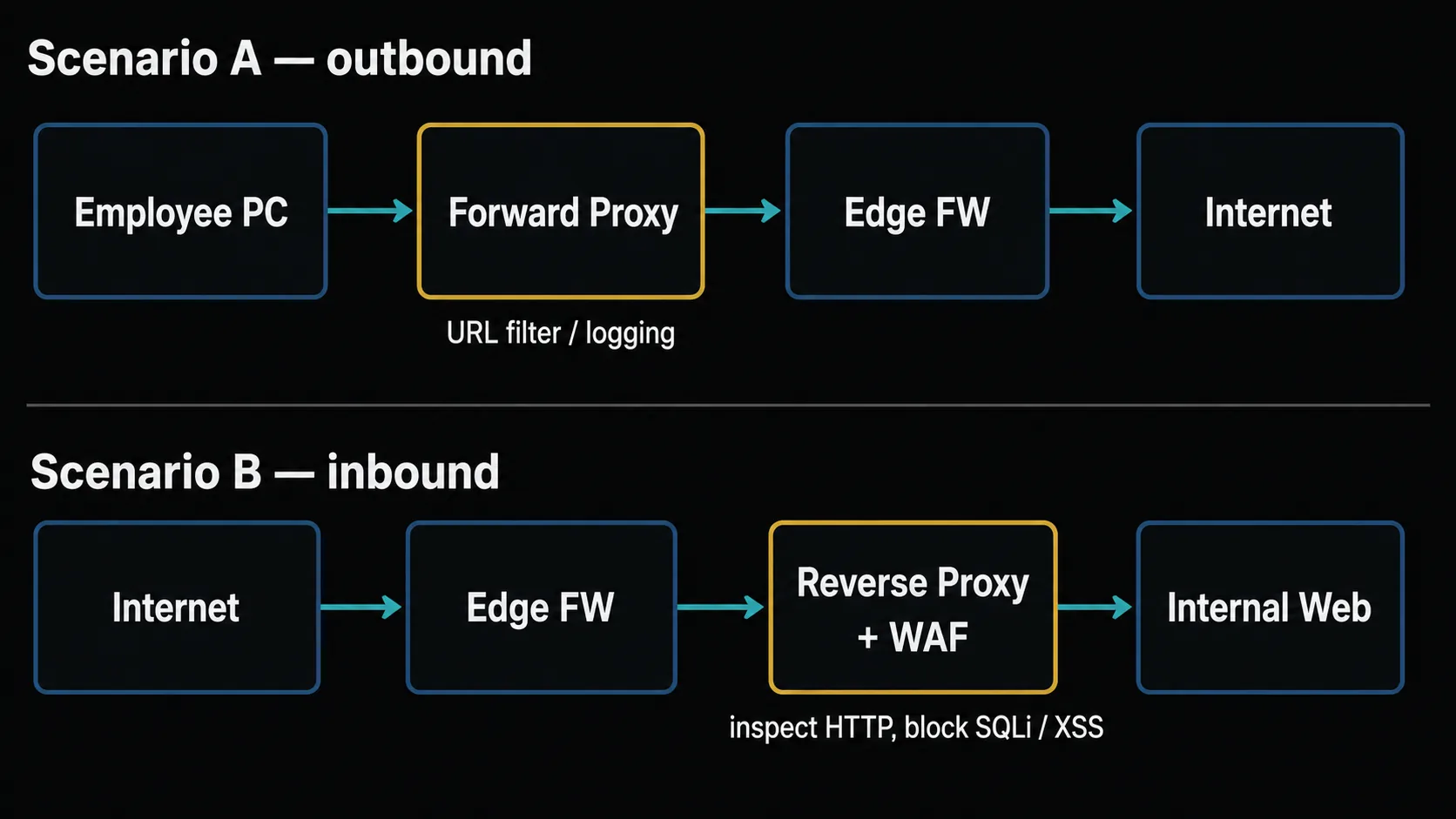
Scenario A: an employee views an external website (internal → outbound)
[Employee PC]
   ↓ ① open https://example.com in the browser
[Internal DNS server]  → ② resolves the name (recursively / forwarding to external DNS as needed) and returns the IP for example.com
[Forward proxy]        → ③ checks the URL, allows the request, aggregates logs
[Edge firewall]        → ④ verifies/records the egress port (443) is permitted
[Internet]             → ⑤ the request goes out over TLS (port 443) to the server
[example.com web server]
   ↑ the response returns in reverse order; if the F-Proxy cached it, next time is faster
What gets protected: the F-Proxy blocks dangerous sites (malware defense) and aggregates access logs (auditable later). By closing unneeded egress ports, the Edge FW makes it harder for any malware that does get in to reach an external command server (C&C).
Scenario B: someone outside views your company's website (outside → inbound)
[External user's browser]
   ↓ ① open https://www.example.com
[External DNS]         → ② returns the R-Proxy's public IP
[Edge firewall]        → ③ verifies the inbound port (443) is permitted
[Reverse proxy + WAF]  → ④ terminates TLS; the WAF inspects the content (blocks SQLi / XSS, etc.)
[Internal firewall]    → ⑤ checks the DMZ → internal LAN traffic against the allow rules
[Internal web server]
   ↑ the response returns in reverse order; the R-Proxy re-encrypts it on the way out
What gets protected: the WAF blocks application-layer attacks (SQLi / XSS, etc.), and the R-Proxy hides the real web server's IP to shrink the attack surface. With two firewall layers, traffic that passes through the DMZ still cannot reach the inside directly. Note that flaws in the app itself that slip past the WAF (e.g., holes in authorization logic) need separate defenses and are out of scope here (for the design of who may do what, see authentication and authorization basics).
Scenario C: a remote employee reaches an internal system (two approaches, side by side)
With remote work, the question is "how do you get from outside into the inside?" Here is the traditional VPN next to modern ZTNA.
C-1: the traditional VPN model
[Remote employee PC] (home / on the road)
   ↓ ① launch the VPN client → ID/password + MFA
[VPN gateway] (DMZ or cloud)
   ↓ ② on success → establish an encrypted tunnel
   ↓ ③ from here on, treated as "a member of the internal LAN"
[any resource on the internal LAN] — file servers / internal Web / DB, etc.
→ The problem: depending on configuration, once the VPN is up the user can often reach a wide swath of the internal network (lateral-movement risk). The flatter the network — the less it is segmented — the stronger this tendency.
C-2: the ZTNA model (modern)
[Remote employee PC]
   ↓ ① specify the destination (the URL of one specific app)
[ZTNA broker] (cloud)
   ↓ ② evaluated per session and re-checked continuously: identity (IdP) + device posture + location + time
   ↓    if OK, a tunnel is set up to that specific app; with proper policy, other resources stay out of reach
[that one internal app] — when configured well, lateral movement to other resources is greatly reduced
→ The improvement: because access is granted per app and re-evaluated continuously, the "the whole internal LAN is visible by default" state goes away. This gap between C-1 and C-2 is exactly the heart of the next chapter's zero trust.
From perimeter to zero trust, and how to pick a cloud connection
Zero trust rethinks the perimeter assumption that "the internal LAN is trustworthy" and instead verifies access per session and re-evaluates it continuously with dynamic policy.
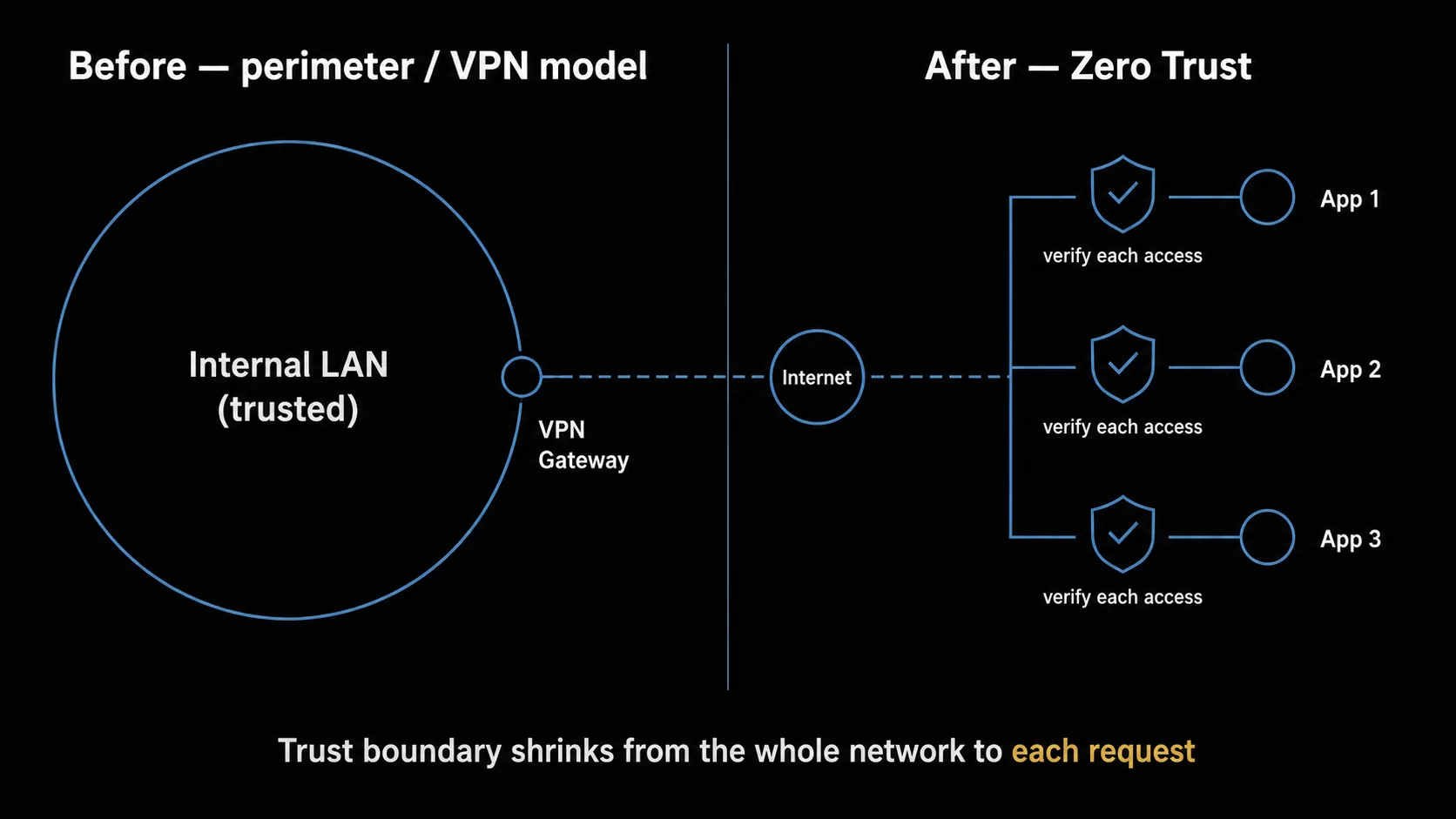
| Aspect | Before (perimeter) | After (zero trust) |
|---|---|---|
| Unit of trust | The whole network (LAN) | Per application |
| When auth happens | Once, at connection time | Per session, continuously evaluated by policy |
| What is evaluated | ID + password + MFA | + device posture / location / time |
| Exposure | The VPN's IP is visible from the internet | Apps are hidden, reachable only via an agent |
| Blast radius on failure | Break the auth and the whole internal network is exposed | One app only + detectable and blockable |
The technical foundation for this idea is NIST SP 800-207 (Zero Trust Architecture). At its core are principles such as "do not trust based on network location alone / grant access per session / continuously verify with dynamic policy" — and the "continuously re-evaluate" stance of Scenario C-2 is one concrete expression of them [primary] NIST SP 800-207.
A realistic migration: you do not have to throw out the VPN overnight. Keep the VPN for now and shift new access to ZTNA first — that is the painless path. Make MFA mandatory for privileged users (admins, infra, finance) first, and aggregate access logs, and the effect of the migration becomes easier to measure too.
In an era of mixing on-prem and cloud, how you connect the internal LAN to the cloud is also a fork in the design. There are four representative methods. The table below organizes each method's mechanism and typical use; in practice you choose by scale, latency, and cost.
| Method | How it works | Typical use |
|---|---|---|
| Internet + TLS | Encrypt a public endpoint with TLS | Dev environments, low traffic |
| Site-to-site VPN (IPsec) | An encrypted tunnel connecting a site to the cloud | Mid-scale, relatively easy to set up |
| Dedicated connection | A private circuit for low latency + stable bandwidth (AWS Direct Connect / Azure ExpressRoute / GCP Cloud Interconnect are representative) | Large-scale, hybrid |
| Private Link / private endpoint | Receive a cloud service (DB / storage, etc.) on a private IP | DB / API over an internal path |
Product names change fast, so confirm the current name and conditions in each cloud's official docs when you select. And note that the F-Proxy / R-Proxy / DNS devices above now mostly run on VMs or containers — the isolation principles behind that are covered in virtualization and sandboxing.
When you connect a cloud or SaaS, the handling of data and the terms of service weigh as much as the connection method. The terms and contract side is covered in Reading the Terms Before You Use an AI Service, so refer to it as needed.
These design directions are not unrelated to public policy. In the United States, federal agencies were directed by OMB Memorandum M-22-09 (2022) to meet zero-trust goals by the end of FY2024 (now past — check the current status in the latest official sources) [supporting] OMB M-22-09, with CISA's Zero Trust Maturity Model offering a staged path [supporting] CISA ZTMM; FedRAMP is the government-wide program for authorizing the security of cloud services [supporting] FedRAMP. In the EU, the NIS2 Directive — transposed into each Member State's national law (transposition deadline 17 October 2024) — sets out cybersecurity risk-management measures and incident-reporting duties for essential and important entities [supporting] NIS2 Directive (EU) 2022/2555. This article is not a policy explainer, but documenting zero trust, MFA, and access control pays off — the more so the closer you are to public-sector or large-enterprise procurement, where it is best built in from the planning stage (confirm the current scope and deadlines of each framework in official sources).
Summary
An enterprise network reads, from a "three zones + two firewalls" base, through the placement of parts and the flow of traffic. To close, here is a checklist you can use as-is in your own project (copy and paste it).
[At project-planning time]
□ Decide your zoning (internal / DMZ / Internet; for cloud, public / private subnets)
□ Decide your DNS design (naming convention for internal domains, how to split internal vs. external resolution)
□ Unify identity (center SSO + MFA on AD / Entra ID or similar, and make MFA mandatory)
□ Choose your access method (VPN or ZTNA; prefer ZTNA for new projects)
□ Choose your cloud-connection method (dedicated connection / site-to-site VPN / over-the-internet, by scale)

[Before release / in operation]
□ Enable a WAF (a cloud WAF or a dedicated WAF)
□ Minimize public endpoints (hide them behind Private Link where possible)
□ Make MFA mandatory for privileged users (admins, infra, finance)
□ Aggregate logs (collect FW / WAF / proxy / identity / VPN logs in one place)
□ Hold a ZTNA migration roadmap (keep the VPN for now while shifting new access to ZTNA)
Related posts: The Pre-Ship Rights Checklist / Reading the Terms Before You Use an AI Service
References
Centered on primary materials. A trailing (primary) marks a primary source; (supporting) marks official program pages / policy documents used for orientation.
Zero-trust technical standard
Core protocols (IETF RFC)
- RFC 1034 / RFC 1035 — Domain Names (DNS, 1987)(primary)
- RFC 8446 — TLS 1.3 (2018)(primary)
- RFC 4301 — Security Architecture for IP (IPsec, the basis of VPNs, 2005)(primary)
- RFC 6749 — OAuth 2.0 (2012)(primary)
Cloud connectivity (official docs, representative)
- Dedicated: AWS Direct Connect / Azure ExpressRoute / GCP Cloud Interconnect
- Private connectivity: AWS PrivateLink / Azure Private Link / GCP Private Service Connect
US / EU policy & programs
- OMB Memorandum M-22-09 — Moving the U.S. Government Toward Zero Trust Cybersecurity Principles (2022)(supporting)
- CISA — Zero Trust Maturity Model(supporting)
- FedRAMP(supporting)
- Directive (EU) 2022/2555 (NIS2)(primary)
Product, service, and program names change with rebrands and amendments. When you use them, confirm the current names, scope, and deadlines in the official sources above.
On AI assistance: Starting from points the author already knew, the author used LLMs (Claude by Anthropic, with a second, independent model cross-checking the technical facts) to research, organize, and summarize, then verified the facts against the primary sources cited above and revised accordingly. Entries marked (primary) point to standards, RFCs, or official regulations; (supporting) entries are program/policy pages used for orientation.
About the author
More than 20 years of electrical and software development — from control engineering at a major electronics manufacturer — plus about 10 years of solo development. Across hardware and software, and across enterprise and individual work, I publish the basics that "become a risk if you don't know them," and I plan to cover practical ways to use AI as well. More at About this blog.