Key Points
- Core — Isolation for running code safely comes in five layers: VMs, microVMs, containers, OS sandboxes, and WebAssembly. The stronger the isolation, the slower and heavier it gets. Choosing by "what is my trust boundary?" — rather than memorizing product names — leads you to the right layer for your environment.
- Who this is for — primarily indie developers and side-project builders who run OSS scripts or AI-generated code locally; also useful for corporate practitioners adopting AI coding agents (Claude Code / Codex CLI) who need to sort out where execution happens and who is responsible.
- Portable takeaway — the five-layer isolation-vs-performance map, the VM/container/sandbox mechanics, and the eight-item AI-agent sandbox checklist hold regardless of jurisdiction. The standards-and-procurement part below is US/EU-focused (NIST SP 800-190, FedRAMP, CISA/NSA; EU CRA). Building in or for Japan? The Japanese edition covers Japan's drivers (ISMAP, IPA).
- What's out of scope — Kubernetes operations in depth / case-by-case design or audit judgments / container image licensing (out of scope here) / encryption and network defense (communication security) / vendor product rankings.
この記事の要点(日本語版はこちら)
- 本記事は 米国・EU の枠組みを背骨にした「国際版」 です(日本語版の翻訳ではなく、制度パートの対象法域が異なる対の記事。技術部分は法域に中立です)。
- 日本の制度(ISMAP・IPA の橋渡し)を主役にした内容は、日本語版 を参照してください。
Written: 2026-06 / Scope: the technology is jurisdiction-neutral; the standards part is US/EU-focused / last_updated: 2026-06-10 Changelog: 2026-06-10 first published as an international (US/EU) edition
This article is educational material, not design advice for a specific environment
This is a general explainer for organizing virtualization and sandbox isolation — not design advice or a substitute for a security audit of any specific system or organization. It does not guarantee the accuracy, completeness, or currency of its contents; product names, service names, pricing terms, standards, and regulations change with rebrands and amendments. For real decisions about architecture, implementation, or procurement, always consult your own security / infrastructure team, a qualified specialist, each product's official documentation, and the primary specifications. All information is provided "AS IS." To the maximum extent permitted by law, the author and YATA-NODE accept no liability for any loss or damage arising from the use of or reliance on this article. Use it at your own risk.
About this series: this is the international edition of the third post in YATA-NODE's "how things work" series. The first post, How Enterprise Networks Work, covered "where to place the boxes (a map of placement)"; the second, Communication Security, Layer by Layer, covered "at which layer you defend the traffic (a map of defense)." This post gives a single overview of "where to run code safely (a map of execution)." The three maps stand alone, but if the overall network picture matters to you, starting from the first post makes this one easier to place.
A few terms (for newcomers): the minimum vocabulary that recurs below.
- Isolation: confining a program so it cannot affect the host (your machine or server) or other programs — limiting what it can see and touch.
- Untrusted code: code you cannot fully vouch for — an OSS script you found online, code generated by an AI, code submitted by your users.
- Trust boundary: the line where you decide "inside this, I trust; outside, I don't." Isolation is the question of which technology draws that line.
- Sandbox: the umbrella term for an isolated environment that confines untrusted code. In this article it usually means the lightweight kind built from OS features (an OS sandbox).
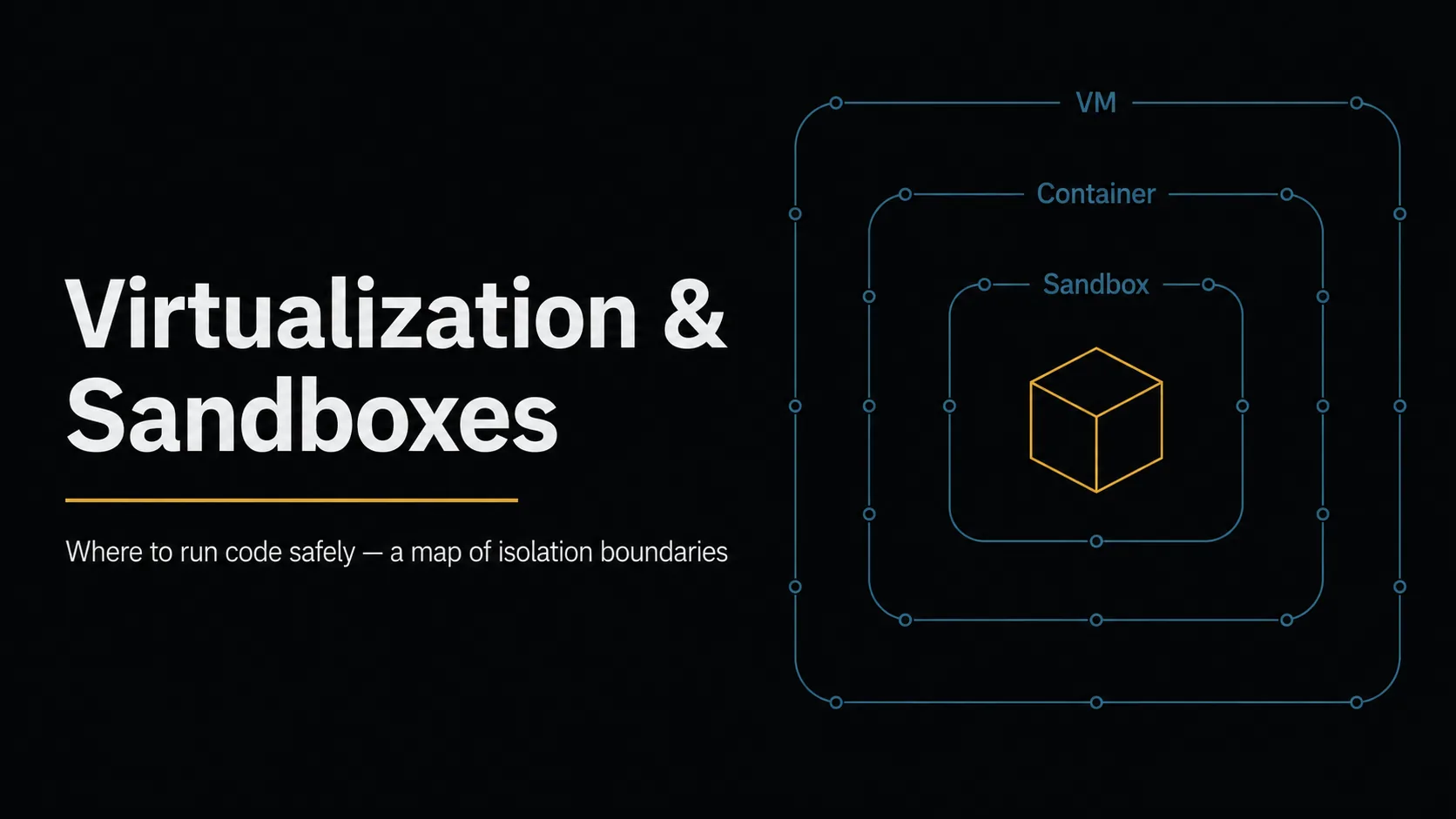
Have you ever run a script you found online — or code an AI just generated — "just for a moment" directly on your machine? There are in fact five options for where code runs: VMs, microVMs, containers, OS sandboxes, and WebAssembly, and they line up along one consistent trade-off: the stronger the isolation, the slower and heavier it gets. This article ① draws that five-layer map, ② pins down how VMs and containers differ mechanically, ③ organizes how to "try it safely first" with OS sandboxes, ④ answers the question the AI-coding-agent era has made routine — "whose sandbox is this code running in, and who is responsible?" — and ⑤ closes with the standards that drive adoption. Not by memorizing product names but by "where do I draw the trust boundary," let's make the execution environment a deliberate choice.
Isolation is a strength-vs-performance trade-off — the five-layer map
The punchline first: there are five isolation layers, and they line up on a single axis — the stronger the isolation, the slower the startup and the heavier the footprint. Keep this map in mind and individual product names sort themselves into places.
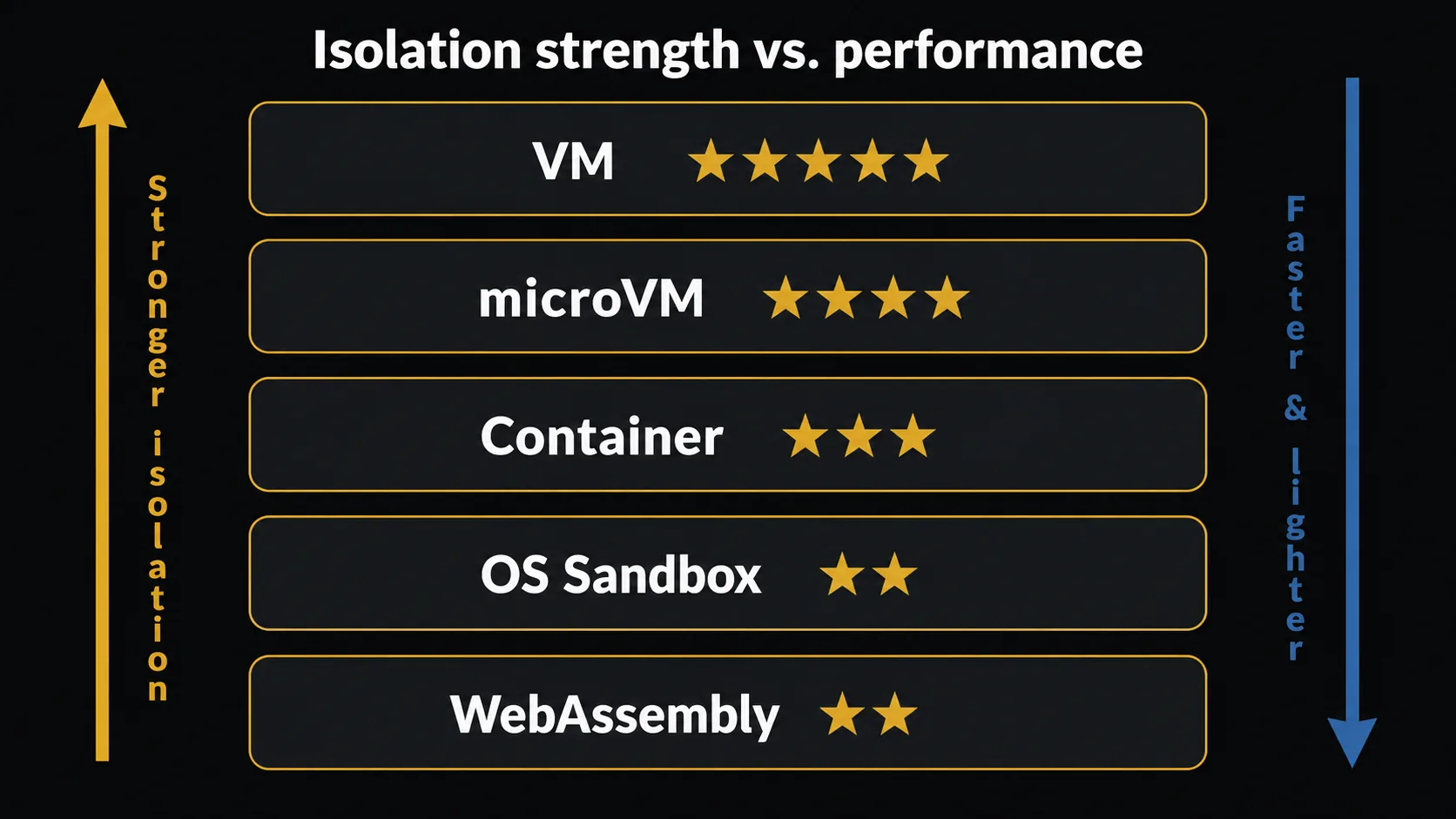
| Layer | Isolation | Startup | Footprint | Typical use | Examples |
|---|---|---|---|---|---|
| VM (virtual machine) | ★★★★★ (separate OS) | tens of seconds–minutes | large | running different OSes, strong isolation | VirtualBox / VMware / Hyper-V / KVM |
| microVM | ★★★★ (a lightened VM) | 100ms–seconds | medium | tenant isolation in serverless platforms | Firecracker / Kata Containers |
| Container | ★★★ (shared kernel) | under a second | small | per-app packaging | Docker / Podman / containerd |
| OS sandbox | ★★ (process + permission limits) | same as a process | tiny | browsers, untrusted code | bubblewrap / Seatbelt / AppContainer |
| WebAssembly | ★★ (language-runtime scoped) | milliseconds | tiny | plugin execution, edge | Wasmtime / Wasmer (WASI) |
Using the table is simple: weigh "how much you would lose" against "how fast and light you need it" and pick the layer. Want a whole separate OS? A VM. Want to ship an app quickly? A container. Want to confine a single process? An OS sandbox. In practice these are also combined — running containers inside a VM and applying an OS sandbox to a process inside is not unusual. The execution environments of AI coding agents, covered below, are a live example of exactly this nesting.
VMs and containers — the mechanics are the isolation
"VM or container, which is better?" is a common framing, but it is not a ranking — it is a difference in what is shared and what is separated. A VM emulates hardware and separates the entire OS; a container shares the same kernel and separates only what processes can see. That structural difference is exactly the difference in isolation strength and weight.
![Structural comparison of VMs and containers (simplified). Left = VM (bottom to top: Hardware → Hypervisor → Guest OS A / Guest OS B; whole OSes separated). Right = container (App A / B → Docker・Podman [user-facing tools] → containerd・CRI-O [runtimes] → runc・crun [low-level OCI] → Linux kernel [namespaces / cgroups / capabilities]; shared kernel). A shared kernel is lighter but provides weaker isolation. The Type 1 / Type 2 distinction is in the body.](/blog/virtualization-sandbox-for-builders/fig3_en.webp)
VMs — a hypervisor separates whole OSes
There are two types of hypervisor behind VMs.
- Type 1 (bare-metal): the hypervisor runs directly on the hardware (no OS beneath it). VMware ESXi, Hyper-V (server use), and Xen are the canonical examples; data centers and clouds run on this type. KVM, where the Linux kernel itself becomes the hypervisor, is sometimes classified as halfway between Type 1 and Type 2.
- Type 2 (hosted): the hypervisor runs "as an app" on your everyday OS. VirtualBox, VMware Workstation / Fusion, and Parallels Desktop are typical, well suited to disposable test environments on a dev machine.
A VM's strength is that even the guest kernel is separated, so whatever happens inside the guest rarely reaches the host. The cost is one OS worth of memory and disk, plus tens of seconds to minutes of startup.
Containers — same kernel, separate worlds
A container is a combination of three Linux kernel features: namespaces (separating what a process can see — process lists, network, filesystem; currently eight kinds), cgroups (capping resources such as CPU and memory), and capabilities (splitting root privileges so only the needed slices are granted). Because it "fakes a separate system on the same kernel," it starts in under a second and stays light — but a kernel vulnerability can break the isolation itself (container escape), a risk that is structurally higher than with VMs.
Tool names sort into layers: the user-facing tools (high-level runtimes) developers touch (Docker / Podman / nerdctl) → the container runtimes (CRI implementations) that manage container lifecycle (containerd / CRI-O) → the low-level OCI runtimes that actually spawn the process (runc / crun) → the Linux kernel. Compatibility is standardized by the three OCI (Open Container Initiative) specs (runtime-spec / image-spec / distribution-spec) — which is why an image built with Docker runs under Podman.
Docker Desktop's commercial-use terms (as of this writing)
Docker Desktop requires a paid subscription for commercial use in organizations with 250 or more employees or US $10 million or more in annual revenue (either one suffices; per Docker's Pricing FAQ, effective 2024-12-10 — the original wording grants free use only when "fewer than 250 employees and less than US $10,000,000 in annual revenue" both hold). Government entities require a subscription regardless of size. Indie developers and small organizations stay in the free tier, but check the terms if you use it at work. Note that these terms apply to the Docker Desktop GUI app; Docker Engine (the OSS CLI and daemon alone, Apache-2.0), which runs natively on Linux, is not subject to these commercial terms and is free to use. Other OSS alternatives include Podman and nerdctl. Pricing and terms change; confirm the latest official information when you adopt it.
microVMs — "VM isolation at container speed"
Between the two sit microVMs: lightweight VMs with device emulation trimmed to the minimum. The canonical examples are Firecracker, which AWS released as OSS and which is used in serverless platforms such as AWS Lambda, and Kata Containers, which gives VM isolation behind a container interface. Startup is 100ms to a few seconds, combining "no shared kernel" with serverless-grade launch speed. Firecracker's adoption in serverless platforms has made microVMs a spreading choice for isolating multi-tenant environments where strangers' code lives side by side.
OS sandboxes and "try it safely first"
Often you want to confine just one process without standing up a VM or a container. Just as browsers isolate each tab's rendering process, operating systems ship features that restrict permissions per process. That is the OS sandbox.
| OS | Core mechanisms | Tools / examples |
|---|---|---|
| Linux | seccomp (syscall filtering) / Landlock / AppArmor / SELinux / user namespaces | bubblewrap / firejail / nsjail / gVisor |
| macOS | Seatbelt (sandbox-exec) / App Sandbox | Mac App Store apps must use App Sandbox |
| Windows | AppContainer / Windows Sandbox (Pro/Enterprise) | Windows Sandbox is a disposable isolated desktop |
| Language runtime | WebAssembly + WASI | Wasmtime / Wasmer (only granted capabilities work) |
Two scenarios cover most indie-developer needs.
Scenario 1: trying an OSS script you found online, safely first
- Minimum: run it under
firejailorbubblewrap, restricting access to your home directory and cutting the network - Recommended: run it in a Docker / Podman container (
--network none, minimal-vmounts,--read-only) - Strong isolation: run it in a disposable VM such as VirtualBox (with a snapshot, anything that happens can be rolled back)
Scenario 2: adding a "users can write code" feature to your own service
- Lightest: WebAssembly + WASI (Wasmtime) — millisecond startup, suited to plugins
- Middle: gVisor (a userspace kernel that absorbs syscalls, shrinking the attack surface of the real kernel) or Kata Containers
- Heaviest: Firecracker microVMs — consider this tier when strangers' code shares the platform
- Avoid: running it directly as a host OS process (if it escapes, you lose everything)
The common principle: when in doubt, go one layer stronger. The cost of over-isolating is only "slower and heavier"; the cost of under-isolating is your host environment itself. Note that the safety of the container image itself (provenance, vulnerabilities, signatures) is a separate problem — the supply-chain angle touched on in the OSS licenses post — and SBOMs and image scanning are covered in choosing SBOM tools.
AI agent sandboxes — where is the trust boundary?
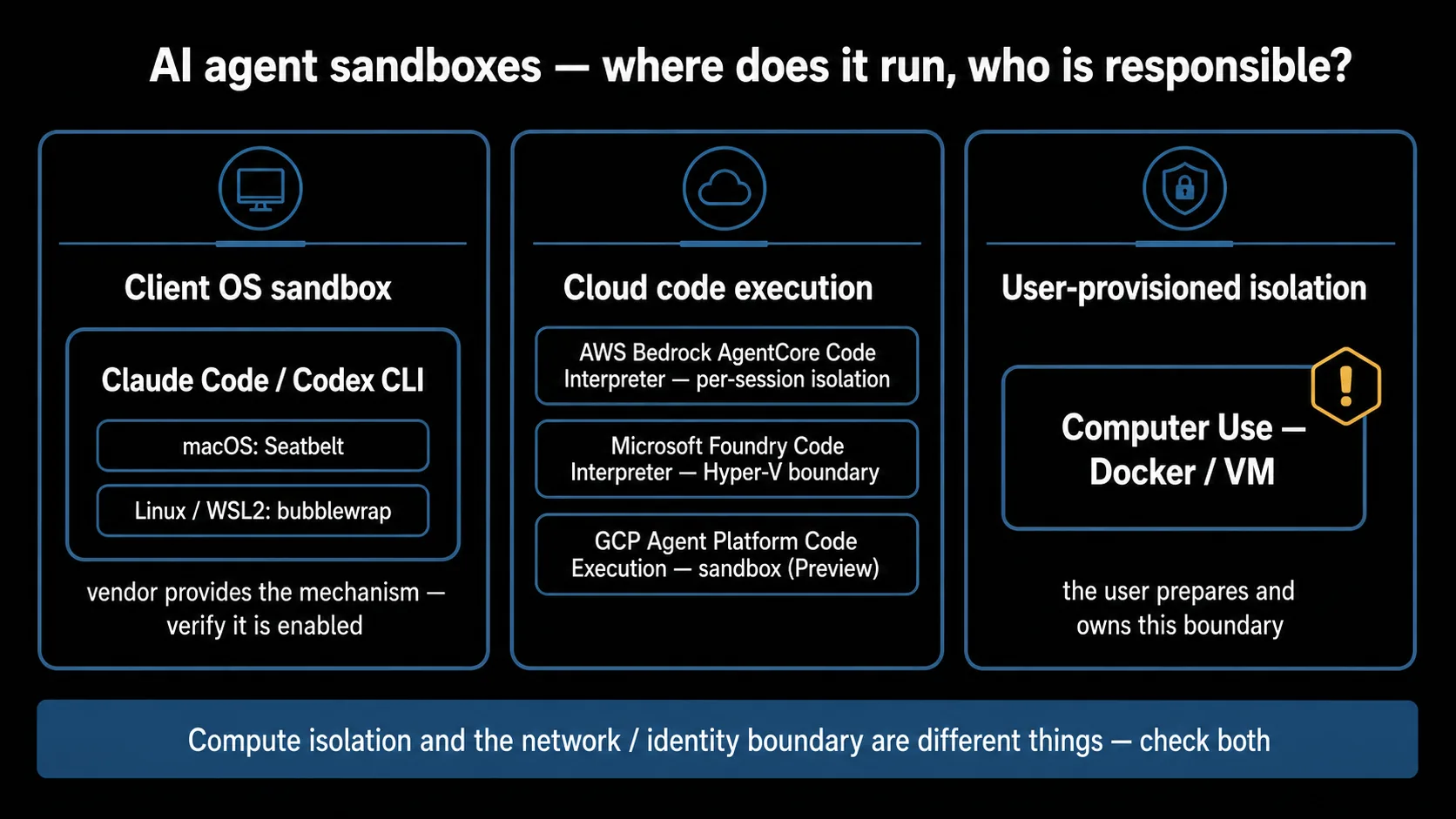
This is the heart of the article. AI coding agents (Claude Code, Codex CLI, and others) execute LLM-generated code and commands in your environment — and, depending on your permission and approval settings, can do so automatically. Running untrusted code becomes routine. The question to ask is: "whose sandbox is this execution sitting in, and who is responsible?"
The same word "isolation" can mean different layers — Anthropic as an example
"The agent isolates execution" is not one single thing. Reading across Anthropic's documentation, for instance, the word "isolate" refers to at least five different layers depending on context (this is this article's own convenience grouping).
| Usage | Context | Isolation technology | Responsible party |
|---|---|---|---|
| Bash execution sandbox | Claude Code command execution | Linux/WSL2 = bubblewrap / macOS = Seatbelt | Anthropic (provides the mechanism) |
| Worktree isolation | preventing directory collisions between parallel sessions | Git worktree | Anthropic |
| Computer Use isolation | the desktop-operation API's environment | Docker / VM (user-provisioned) | The user |
| Subagent isolation | Agent SDK subagents | a separate context window (not process isolation) | Anthropic |
| MCP server isolation | desktop-app extension servers | the OS's ordinary process boundary | Left to the OS |
Note three things: worktree isolation prevents file collisions and is not a security boundary; subagent isolation is a separation of in-memory context, not OS isolation; and Computer Use puts you on the responsible side — you provision the Docker container or VM. (OpenAI ships the equivalent capability as well: the Computer-Using Agent (CUA), available as the computer use tool in the API and integrated into the consumer-facing ChatGPT agent.) When you hear "it's isolated," check which layer is meant.
Both vendors converged on "boring" OS mechanisms for the client side
What stands out is that Anthropic (Claude Code) and OpenAI (Codex CLI) both use the same OS-standard sandbox mechanisms for local code execution: Seatbelt on macOS, bubblewrap on Linux and WSL2 (stated in both vendors' official docs). Rather than inventing a new isolation runtime, both independently chose to trust "boring," battle-tested OS mechanisms. Concretely, the baseline is two boundaries: ① filesystem isolation that blocks writes outside the working directory, and ② network restriction. The network mechanism differs by vendor, though: Claude Code routes traffic through a proxy and prompts before reaching a new domain (a domain-allowlist model), while Codex disables network access by default and asks for approval before going online (an approval flow rather than a fixed allowlist).
Two caveats. First, the mechanism is not necessarily on by default. Claude Code, for example, requires enabling it (/sandbox or settings), and on Linux / WSL2 it depends on packages (bubblewrap / socat). If dependencies are missing, the documented default behavior is to warn and fall back to unsandboxed execution (a stricter setting exists). Always verify "is it actually enabled?" Second, Windows differs between the two: Codex uses a native Windows sandbox under PowerShell, while Claude Code does not support native Windows and directs you to run under WSL2. The "convergence" story applies to macOS / Linux / WSL2.
Cloud-side code execution differs by vendor
You can also delegate agent code execution to the cloud (the Code Interpreter family). The isolation differs per vendor.
| Service | Isolation (per official docs) | Constraint examples |
|---|---|---|
| AWS Bedrock AgentCore Code Interpreter | per-session isolation (official docs describe a containerized environment; security researchers at Unit 42 reported observing ephemeral, session-dedicated microVMs) | supports long-running sessions |
| Microsoft Foundry Code Interpreter | Hyper-V boundary (officially stated) | no outbound network |
| GCP Gemini Enterprise Agent Platform (Code Execution) | sandbox ("Secure sandbox execution", Preview) | no explicit network-constraint wording found officially (verify the latest before adopting) |
Don't over-trust 'it's a microVM, so it's safe'
Security research group Palo Alto Networks Unit 42 demonstrated, against an AWS code-execution environment, that even where session isolation (compute isolation) itself is robust, network isolation could be bypassed via DNS tunneling, and an internal metadata service accepted unauthenticated requests. (AWS shipped a fix on 2026-02-14: for accounts that had not previously used the relevant microVM features, newly launched environments now default to token-required MMDSv2 only; note that existing environments retain backward compatibility.) The lesson generalizes: compute isolation (VM / microVM / container) and the network / identity boundaries are different things. When you hear a strong isolation technology's name, separately ask "and how are traffic and credentials protected?"
An eight-item checklist before adopting
When adopting an AI agent (personally or organizationally), paste and check:
[AI agent sandbox boundary check]
□ Where does this agent's code/operation run (local OS / cloud / your own Docker–VM)?
□ Can confidential data (source, credentials, customer data) flow outside the sandbox boundary?
□ Are there known escapes for that sandbox (vulnerability reports, research)?
□ Is there a path where prompt injection triggers unintended behavior — and a mitigation?
□ Is there a human confirmation before destructive operations (delete, send, spend)?
□ Are network/file/execution permissions least-privilege (allowlist-based)?
□ Are credential directories (~/.aws, ~/.ssh, etc.) excluded from the sandbox's read scope
  (some implementations can read them by default; an explicit read deny is required)?
□ Has the responsibility split (vendor / you / OS / third-party APIs) been put into words for your team (or yourself)?
Beneath this checklist is the question that has run through the whole article: what is your trust boundary? The convenience of agents comes from automated execution, and that automation is inseparable from "executing untrusted code." If you can articulate the boundary, you can enjoy the convenience with confidence. The thinking about where an agent is allowed to connect (APIs, domain restrictions) continues from Communication Security, Layer by Layer.
What drives the standards — US guidance and procurement, EU hard law
Almost no law names isolation technologies directly. Instead, guidelines, benchmarks, and procurement programs set the de facto bar — and the US and the EU do it in characteristically different ways.
US: guidelines plus procurement. The foundational text for container security is NIST SP 800-190 (Application Container Security Guide, published 2017-09) — non-binding, but the reference baseline in practice (full virtualization is covered by the SP 800-125 series). CIS Benchmarks supply hardening configurations for Docker and Kubernetes. Procurement is where teeth appear: FedRAMP, effectively mandatory for US government cloud sales, has container-specific vulnerability-scanning requirements (a 30-day scanning window that begins when the container is deployed to the production registry, per its 2021 container scanning guidance), and FedRAMP 20x (announced 2025-03-24) is redesigning the authorization process around machine-readable submissions and Key Security Indicators with continuous automated validation. The CISA/NSA Kubernetes Hardening Guidance (v1.2, 2022-08) rounds out the picture with comprehensive recommendations — scanning, least privilege, NetworkPolicy, Pod Security.
EU: cross-product hard law. The Cyber Resilience Act (CRA, Regulation (EU) 2024/2847) is not a container-specific rule but a horizontal law for "products with digital elements" — entered into force 2024-12-10, with reporting obligations applying from 2026-09-11 and full application from 2027-12-11. Its bite for this article's topic is supply-chain due diligence: manufacturers are responsible for ensuring that third-party components they integrate — including base images and libraries in container builds — do not compromise the product's security. Signing and provenance tooling (Sigstore, SLSA) naturally serves as technical evidence for that duty. The CRA also introduces an "open-source software steward" category with lighter obligations.
The implementation layer has its own standards. Kubernetes itself provides Pod Security Standards (Privileged / Baseline / Restricted) as the successor to PodSecurityPolicy (removed in v1.25), and RuntimeClass lets you assign gVisor or Kata Containers per pod when you need stronger isolation than runc.
If you sell to or build for US or EU enterprise and government customers, these are the names that will appear in procurement questionnaires. For Japan's drivers (ISMAP and IPA's bridging of NIST guidance), see the Japanese edition.
Summary
Choosing where code runs is a five-layer trade-off — VM, microVM, container, OS sandbox, WebAssembly — along "the stronger the isolation, the slower and heavier." And in the AI-coding-agent era, "whose sandbox is this code in, and who is responsible?" becomes a routine checkpoint. Here are the checklists to copy and use.
[Before running untrusted code]
□ Where did this code come from (OSS / AI-generated / user-submitted)? Treat it as untrusted
□ What can you not afford to lose (files under home / credentials / other machines on the network)?
□ Did you pick an isolation layer (when in doubt, one layer stronger: sandbox → container → VM)?
□ Network cut off or allowlisted?
□ Mounted/shared directories minimized (read-only by default)?
□ Is the environment disposable (recreatable)? Never run untrusted code somewhere you cannot roll back

[When adopting an AI agent]
□ Checked where the sandbox is and who is responsible, with the eight-item checklist above?
□ Sandbox features (file isolation, domain restriction) actually enabled — not switched off?
□ Human confirmation kept for destructive operations?
Related: How Enterprise Networks Work / Communication Security, Layer by Layer / Pre-ship rights checklist
Sources / References
Last verified: 2026-06-10 / Jurisdiction: the technology is neutral; the standards part of this edition is US/EU-focused (Japan is covered in the Japanese edition).
Specs and kernel mechanisms (primary)
- OCI specs (runtime-spec / image-spec / distribution-spec)
- Linux namespaces (man 7) / cgroups (man 7) / seccomp (man 2) / Landlock
- Apple — App Sandbox / Windows AppContainer / Windows Sandbox
- WASI 0.2 (Bytecode Alliance) / Wasmtime
Virtualization, containers, sandboxes (official)
- Firecracker microVM / Kata Containers / gVisor
- bubblewrap / firejail / Podman
- Docker Pricing FAQ (commercial-use terms)
AI agent sandboxes (official docs and primary reports)
- Claude Code — Sandboxing (Anthropic) / Computer Use Tool (Anthropic) / Computer-Using Agent (OpenAI)
- Codex — Sandboxing (OpenAI)
- AWS — Bedrock AgentCore Code Interpreter (session isolation)
- Unit 42 — Bypassing network isolation in an AWS sandbox (Palo Alto Networks)
- Microsoft Foundry — Code Interpreter / Gemini Enterprise Agent Platform — Scale (Secure sandbox execution, GCP)
US / EU standards and regulation (official)
- NIST SP 800-190 — Application Container Security Guide (2017-09) / NIST SP 800-125A Rev. 1 (hypervisor security)
- FedRAMP — Vulnerability Scanning Requirements for Containers (PDF) / FedRAMP 20x (announced 2025-03-24)
- CISA/NSA — Kubernetes Hardening Guidance v1.2 (PDF, 2022-08)
- CIS Benchmarks — Docker
- EU Cyber Resilience Act — overview (European Commission)
- Kubernetes — Pod Security Standards / RuntimeClass
Product names, service names, pricing terms, and regulations change with rebrands and amendments. This article is a planning-stage overview; when you implement or adopt, verify the latest specifications, scope, and dates in the primary sources above. AI agent sandbox behavior changes especially fast — check the official docs as of your adoption date.
About the author
Over 20 years of electrical and software development at a major electronics manufacturer, starting from control engineering, plus about 10 years of independent development. I write from the fundamentals that "become risks if you don't know them," across hardware and software, corporate and personal — and plan to cover practical AI usage as well. More at About this blog.