
Key Points
- Authentication (who you are) and authorization (what you may do) are two different questions. Telling them apart is where the whole subject starts to make sense.
- Audience: people who deal with AI and cloud account management at work, and individual developers. It is for readers who want to organize identity by role rather than by product name. No prior knowledge is assumed.
- Outcome: you will be able to place password → multi-factor authentication → passkeys → single sign-on → OAuth / OIDC / SAML → Zero Trust on one connected map, and say what each piece does and where it sits.
- Out of scope: product-specific setup steps, migration templates, and implementation code (those live in each vendor's official docs). This piece is the concept map only.
New here? Read top to bottom. Only need the protocols? Jump to "The Protocol Layer." Only here for the regulatory picture? Skip to "The Legal Context." 日本語版 (Japanese version, Japan-jurisdiction): 認証と認可の基礎.
This is educational material, not legal or security advice
This article organizes the concepts of authentication and authorization for general education. It is not technical or legal advice on any specific product, configuration, or contract clause, and it makes no warranty of accuracy, completeness, or currency. Standards (such as NIST SP 800-63) and vendor specifications and defaults change without notice. The descriptions here reflect what could be confirmed as of June 2026; always verify against the current official documentation, and consult qualified professionals (security, IT, or legal counsel) before making design or deployment decisions. Where this article touches law (the U.S. CFAA, the EU's eIDAS), it does so only as conceptual context for why authentication matters — not as a determination of what is lawful or unlawful in any specific case. The information is provided "AS IS," and neither the author nor YATA-NODE accepts liability for any loss arising from its use.
Where this fits in the series: this is one of a set of security-basics articles. We covered the perimeter-and-Zero-Trust mindset in Company networks, explained, how traffic is protected in The big picture of communication security, and isolation of running code in VMs, containers, and sandboxes. This article maps the part that decides who is allowed to reach a resource — authentication and authorization.
Mini-glossary (for newcomers):
- Authentication (authn): confirming who someone is (identity), e.g. with a password or a fingerprint.
- Authorization (authz): deciding what a confirmed user may do (permissions).
- MFA (Multi-Factor Authentication): combining a password with another factor (a phone prompt, a fingerprint) so one leaked factor is not enough.
- Passkey / FIDO2 / WebAuthn: a passwordless method that proves identity with a private key held on your device. FIDO2 and WebAuthn are the underlying specifications.
- SSO (Single Sign-On): signing in once to reach several connected services without logging in again.
- OAuth / OIDC / SAML: protocols for passing authorization or authentication between services (covered below).
- Zero Trust: an approach that stops assuming "inside the corporate network equals safe," and re-checks identity and permissions per resource and per session, according to risk.
"I logged in, so I'm safe" is a natural feeling, but behind a login two separate things are happening: is this the right person (authentication) and what may they do (authorization). On top of that, authentication itself has grown in layers — from passwords toward passkeys, and from a single service toward many connected ones (SSO). This article connects the whole thing into one map, and ends with "what to check from where you sit." The goal is not to pick products or walk through settings; it is to understand which technology sits where on the map.
Authentication vs. Authorization: Telling "Who" from "What You May Do"
The first fork in the road is the distinction between authentication (authn) and authorization (authz). Authentication confirms who someone is; authorization decides what that confirmed person may do. The order is fixed: authentication happens first, and its result feeds the authorization decision.
An office building makes this concrete. Holding your badge to the reader at the entrance, proving you are who you claim to be, is authentication. Then "this person can enter the third-floor engineering area but not the server room" is authorization. Both are about getting in or being kept out, but a different mechanism handles identity and permissions.
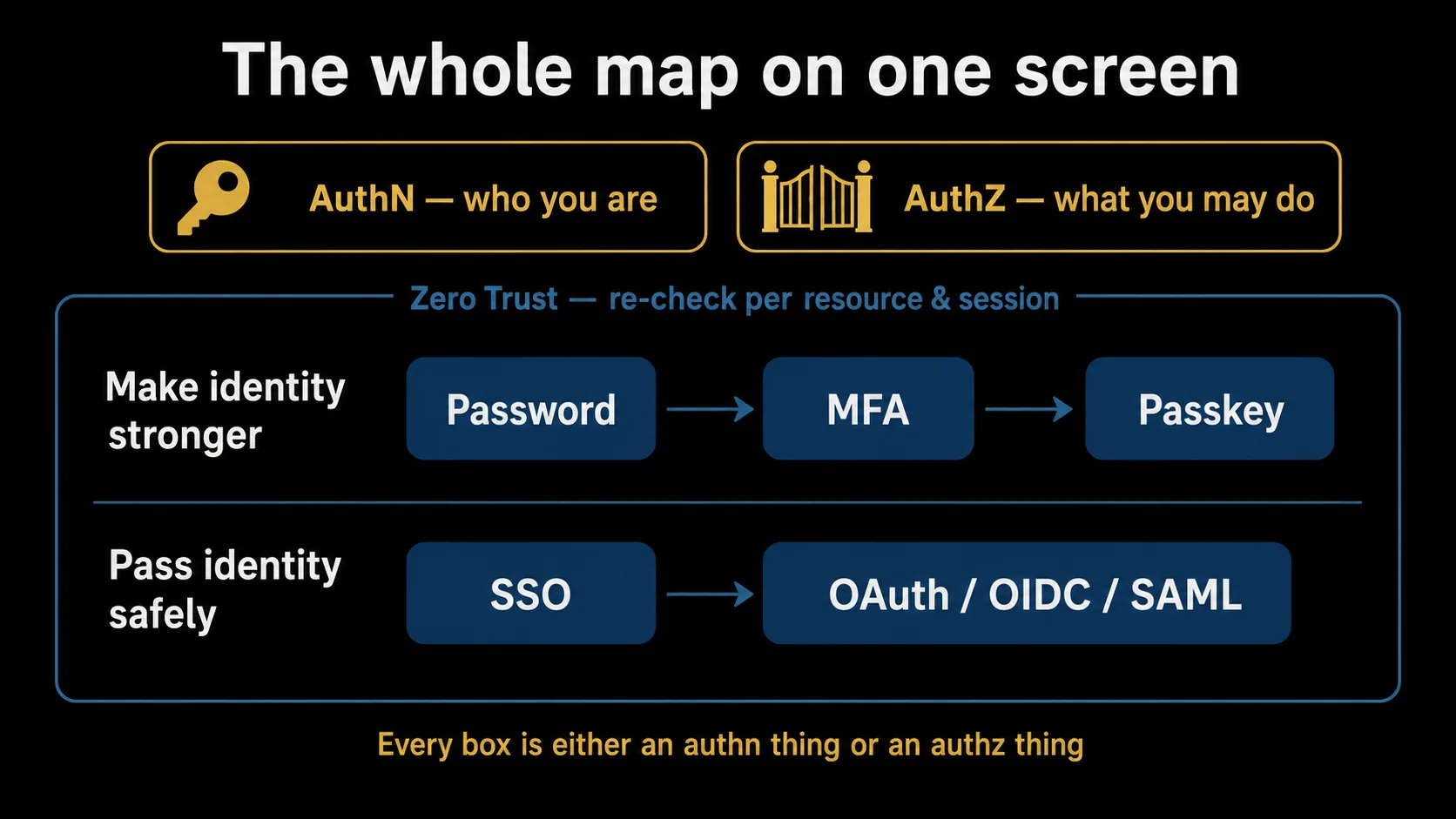
The distinction matters because neither half protects you alone. Perfect authentication is undone by sloppy authorization: a properly logged-in user can still reach data they were never meant to see. And airtight authorization is meaningless if authentication is broken and someone is impersonated. Every technology that follows — passkeys, OAuth, and the rest — ultimately resolves to one of two jobs: making authentication stronger, or passing authentication and authorization around safely. That pair is the origin point of the whole map.
From Passwords to Passkeys: Authentication Strength and NIST's Assurance Levels
The history of authentication runs in two directions at once: making passwords stronger, and not relying on passwords at all.
The starting point is the password. It is convenient but weak to reuse, leaks, and phishing (being tricked into typing it on a fake site). Multi-factor authentication (MFA) was the answer: combine the password (something you know) with another factor (something you have, like a phone, or something you are, like a fingerprint), so one compromised factor is not enough. But MFA has stronger and weaker forms. One-time codes sent over Short Message Service: text messages sent to a phone number; sometimes used for verification codes, though weak against number takeover.See glossary → (Short Message Service) are known to be vulnerable to number takeover (SIM swapping) and to relay through phishing sites. App-generated codes (TOTP) are sturdier, and passkeys are sturdier still.
A passkey (specified by FIDO2 / WebAuthn) does away with the shared password entirely. A private key is held on your device (and, for a syncable passkey, may be copied across your own devices through your cloud account — never shared with the service); the service only ever holds the matching public key. Signing in means signing a challenge with that local private key — so there is no password on the server to steal, and the credential is bound to the real site, which is what makes it resistant to phishing.
The U.S. federal standard NIST SP 800-63 organizes authentication strength into Authentication Assurance Levels (AAL). The current revision, SP 800-63-4, was finalized in 2025. It does not rank specific products; it sets requirements that a method must meet to qualify for a level. Two points are useful for the map. First, phishing-resistant authenticators such as passkeys can satisfy the higher everyday tier (AAL2). Second, the standard is explicit that a syncable authenticator — a passkey that is copied across your devices through a cloud account — cannot be used at the strictest tier (AAL3), which expects a hardware-bound credential. The practical takeaway, without the level numbers, is simply: as you move password → MFA → passkey, impersonation gets harder, and how a passkey is stored still affects how strong it counts as. (Exact AAL definitions and any later revisions: see the References.)
The Protocol Layer: What OAuth 2.0, OIDC, and SAML Each Do
As the number of services grows, holding a separate password for each one stops being realistic. That is where single sign-on (SSO) comes in: authenticate once, and reach the connected services without logging in again. It is common across internal systems and business cloud apps.
Underneath SSO sit three protocols that are constantly confused — OAuth, OIDC, and SAML. Each plays a different role.
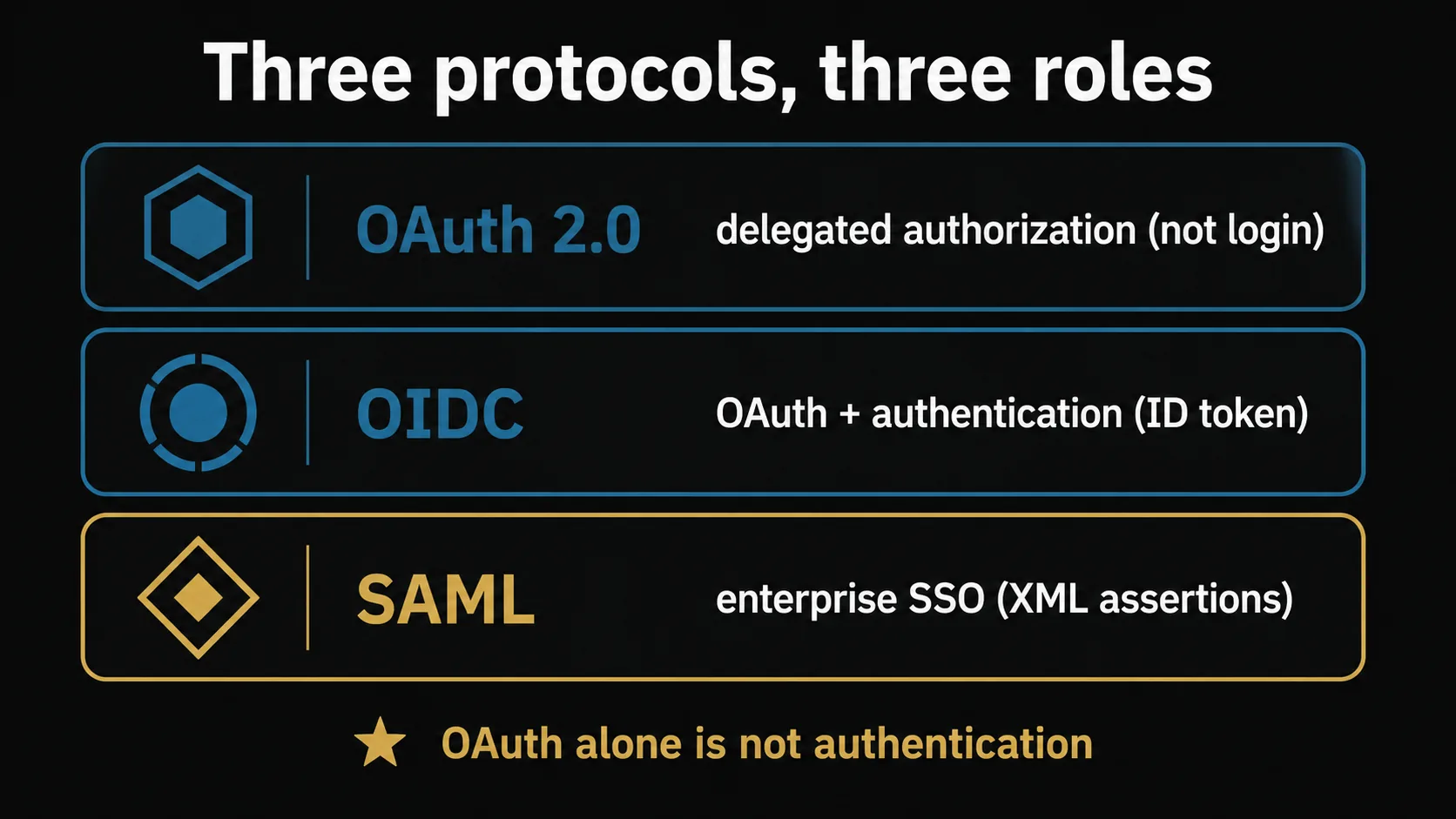
- OAuth 2.0 handles delegated authorization. It lets you grant one app a slice of access to another — "allow this app to read my calendar" — without handing over your password. The key point, and the most common misconception, is that OAuth by itself is not an authentication protocol; it is about delegating permission.
- OIDC (OpenID Connect) is a thin identity layer built on top of OAuth 2.0. It adds a way to receive proof that the identity provider authenticated the user who granted this access (an ID token), which is what powers "Sign in with …" experiences.
- SAML is the long-standing choice for enterprise SSO, exchanging identity assertions in XML. Its role is close to OIDC's, but you will most often meet it in corporate systems and business cloud integrations.
"Which one should I choose" is a design-time question this article does not enter. For the map, it is enough to remember the roles: OAuth delegates permission, OIDC adds authentication on top of OAuth, and SAML is the enterprise-SSO veteran. One more connection helps: after you log in, "staying logged in" is handled either by a session the server remembers or by a token the client carries. What OAuth and OIDC pass around are tokens — keeping that in mind makes the rest of the map click into place.
Zero Trust and Identity as the New Perimeter
Security used to run on a perimeter model: inside the corporate network was trusted, outside was dangerous. Once cloud services and remote work became normal, "inside versus outside" stopped being enough — legitimate accounts now connect from anywhere, all the time.
Zero Trust is the response. Instead of trusting based on where you are on the network, it re-verifies who you are (authentication) and what you may do (authorization) per resource and per session, according to risk. In this model the center of defense shifts from network location to identity. That is the sense in which "identity is the new perimeter."
Everything earlier on the map now pays off. If you re-check identity at each resource, stronger authentication is better (hence passkeys); if you must verify consistently across many services, you need a way to federate identity (hence SSO and the protocols). The U.S. standard NIST SP 800-207 sets out the architecture and principles of Zero Trust, and under it the layers we have walked through stop being separate topics and become one connected system.
The Legal Context: CFAA (US) and eIDAS 2.0 (EU)
Finally, a conceptual note on where authentication meets the law. This is not about deciding what is lawful or unlawful; it is context for why authentication cannot be treated as a mere convenience setting.
In the United States, the Computer Fraud and Abuse Act (CFAA, 18 U.S.C. § 1030) addresses access to a computer "without authorization" or exceeding authorized access. The conceptual link for our map is this: when authentication breaks and someone is impersonated, the event is not only a technical incident — it can touch the line the law has drawn around unauthorized access. Note that the scope of "exceeds authorized access" has been actively litigated (the Supreme Court narrowed it in Van Buren v. United States, 2021), so where exactly the line falls is a legal question for counsel, not something to infer from an article.
In the European Union, the relevant frame is not a hacking statute but an identity framework: eIDAS 2.0 (Regulation (EU) 2024/1183), which establishes the European Digital Identity (EUDI) Wallet. Under it, each Member State is to make at least one EUDI Wallet available to natural and legal persons in the Union, with certain relying parties expected to accept them, on a phased timeline running through the late 2020s. The concept that matters here is that the EU is standardizing assured digital identity at the regulatory level. (These timelines and obligations are detailed and subject to change — confirm the current text before relying on dates.)
Two cautions. Both NIST's assurance levels and eIDAS's levels of assurance use the word "assurance," but they are different regimes; this article does not map one onto the other. And NIST SP 800-63 is a U.S. federal standard — widely referenced, but not directly binding outside the U.S. The point of this section is narrow: authentication is the foundation on which impersonation and breach can escalate into legal exposure, which is why it deserves to be designed, not just switched on. For how any of this applies to your situation, consult the current statutes and qualified counsel.
Wrap-up
Authentication and authorization are two different questions — "who are you" and "what may you do." Seen from that starting point, passwords, MFA, and passkeys are all about making authentication stronger; SSO and OAuth / OIDC / SAML are about passing authentication and authorization around safely; and Zero Trust binds them together by re-checking, per resource and per risk, what the earlier layers established. When the sheer number of products and acronyms feels overwhelming, ask two questions — "is this an authentication thing or an authorization thing?" and "where does it sit on the map?" — and the ground for any selection or design decision falls back into place.
Once the mechanics are clear, the actual setup and operation belong to each vendor's official documentation. As companion pieces, Security settings for major AI services covers how to think about authentication settings in individual services, and Before you build an internal app covers how to fold authentication and authorization into something you build yourself. Read alongside this map, they connect the concepts to the ground.
References
- NIST SP 800-63-4: Digital Identity Guidelines — the U.S. digital identity standard. Authentication Assurance Levels (AAL) are defined in SP 800-63B-4.
- FIDO Alliance: Passkeys — official explainer for passkeys / FIDO2.
- OpenID Connect — how OIDC works (official).
- RFC 6749: The OAuth 2.0 Authorization Framework — the primary OAuth 2.0 specification.
- SAML 2.0 Core (OASIS Standard) — the primary SAML 2.0 specification (OASIS).
- NIST SP 800-207: Zero Trust Architecture — the definition and principles of Zero Trust (U.S. standard).
- Regulation (EU) 2024/1183 (European Digital Identity Framework / eIDAS 2.0, EUR-Lex) — the primary EU law for the digital identity framework.
- 18 U.S.C. § 1030 — Computer Fraud and Abuse Act (Cornell Legal Information Institute) — the U.S. statute on unauthorized computer access.
- Van Buren v. United States, No. 19-783 (2021) — the Supreme Court opinion narrowing "exceeds authorized access" under the CFAA.