
Key Points
- Core — Safety measures for AI services fall into three tiers: enforced by settings, only preventable by per-use discipline, and only granted by enterprise contracts. Knowing where these boundaries lie matters more than memorizing toggles — settings alone cannot prevent everything.
- Who this is for — corporate practitioners tasked with vetting in-house AI adoption, and indie developers on personal plans who want the first settings to check.
- Portable takeaway — the three-tier frame, the pre-input five-question checklist, and the client-data three-way split are jurisdiction-neutral. The drivers section below is US/EU-focused (FTC and state privacy laws; GDPR and the AI Act). Building in or for Japan? The Japanese edition covers Japan's drivers (APPI).
- What's out of scope — the contractual side of Terms of Service (see the AI service terms post) / exhaustive UI walkthroughs (interfaces change fast) / a substitute for your organization's risk or legal review.
この記事の要点(日本語版はこちら)
- 本記事は 米国・EU の枠組みを背骨にした「国際版」 です(日本語版の翻訳ではなく、制度パートの対象法域が異なる対の記事。設定の考え方は法域に中立です)。
- 日本の文脈(個人情報保護法など)を踏まえた内容は、日本語版 を参照してください。
Written: 2026-06 / Scope: the settings framework is jurisdiction-neutral; the drivers part is US/EU-focused / last_updated: 2026-06-11 Changelog: 2026-06-11 first published as an international (US/EU) edition
This article is educational material, not adoption advice for a specific organization
This is a general explainer for organizing the security and privacy settings of AI services — not adoption advice or a substitute for audit or legal judgment for any specific system or organization. It does not guarantee the accuracy, completeness, or currency of its contents; settings screens, plan names, defaults, and availability change frequently (statements reflect the time of writing). For real selection, contract, and configuration decisions, always consult your own security / legal team, a qualified specialist, and each service's official documentation and current plan descriptions. All information is provided "AS IS." To the maximum extent permitted by law, the author and YATA-NODE accept no liability for any loss or damage arising from the use of or reliance on this article. Use it at your own risk.
Where this post sits: Virtualization & Sandboxes covered the mechanics of isolating execution; this post covers the settings you actually flip on each AI service. The contractual side — whether inputs train models, who owns outputs — is the companion topic of Reading AI Service Terms.
A few terms (for newcomers):
- Training opt-out: the setting that keeps your inputs out of model training data. Defaults differ by service and plan.
- Retention: how long your inputs remain on the provider's side. "Deleted by me" and "no longer stored" are different things.
- ZDR (Zero Data Retention): a contract that excludes in-scope inputs/outputs from the provider's ordinary storage. Exceptions exist (out-of-scope products, certain models, legal/safety holds), and it normally requires an enterprise contract and a sales-channel request.
- Autonomous agents: AI that proceeds to command execution, web actions, or file changes with little human confirmation (agent modes, CLI agents, browser-operating agents).
- CLI (Command-Line Interface): operating by typing text commands instead of clicking a GUI; CLI agents such as Claude Code and Codex CLI work this way.
- SSO (Single Sign-On) / SCIM: one login across many services (SSO), with automated account provisioning and deprovisioning (SCIM); together they prevent orphaned accounts.
- SOX (Sarbanes-Oxley Act): a US law requiring public companies to keep internal controls and audit trails over financial reporting; regulated work needs audit logs.
"Don't put secrets into AI" is common advice — but how much can settings actually enforce? The punchline: safety measures split into three tiers — ① mechanically enforced by settings (opt-outs, deny lists, sandboxes), ② only preventable by per-use discipline (the decision not to paste something), ③ only granted by enterprise contracts (ZDR, audit logs, regulated-work agreements) — and the boundary varies a lot by service type. This article ① draws the three-tier map, ② covers the universal pair of training opt-out and retention, ③ organizes the three mechanical layers for CLI and autonomous agents, ④ turns "may I paste this?" into a checklist, and ⑤ closes with the contract-only guarantees and the US/EU drivers behind them. Design your defenses by tier, not by memorized toggles.
"Enforced by settings" has a boundary — the three-tier frame
Before any individual toggle, the whole map in one view.
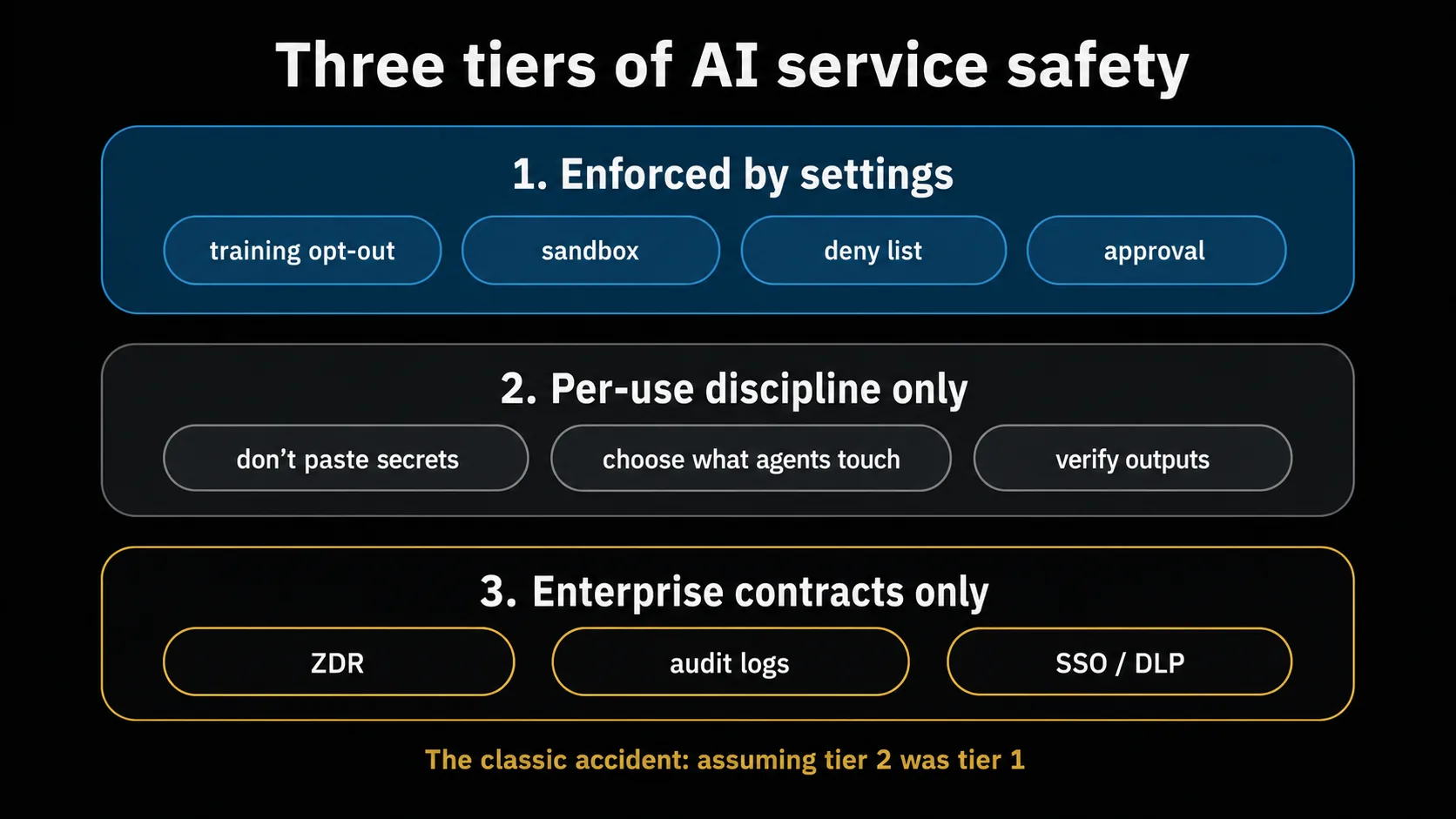
| Tier | What it is | Examples |
|---|---|---|
| ① Enforced by settings | Configuration that constrains model / system behavior | training opt-out / sandboxes / deny-listing secret files / pre-execution approval / shorter retention |
| ② Per-use discipline only | Judgments no setting can make for you | the decision not to paste secrets / choosing what sites and data an autonomous agent may touch / verifying outputs before redistributing them |
| ③ Enterprise contracts only | Guarantees that do not exist on personal plans | ZDR / audit logs / SSO / DLP integration / regulated-work agreements (e.g., BAAs) |
Use the map two ways. First, the classic accident is assuming something was tier ① when it was really tier ② (the paste-or-not judgment stays in tier ② no matter what you configure). Second, declare tiers ② and ③ upfront — whenever this article says "settings can enforce," it means tier ① only; beyond that is discipline and contracts.
For everyone first: training opt-out and retention
This is the universal tier-① pair, regardless of plan.
- On consumer chat plans, training on your inputs can be enabled by default. At the time of writing, both ChatGPT and Claude.ai personal plans let you check and change whether your inputs are used for training in the settings screen; turn it off if you don't want training. Defaults and labels can change with plan revisions, so check the data/privacy section on day one.
- API offerings (both vendors) typically exclude your inputs from training by default. But "not used for training" and "not stored" are different: inputs may be retained for some period for abuse monitoring and similar purposes, and the duration and conditions differ by vendor, model, and contract (they differ between the two vendors even at the time of writing — see the retention docs in the references).
- If you need data not stored at all, that is ZDR — a contract, normally via an enterprise sales channel (tier ③), not a toggle.
One under-appreciated retention lesson. In the US copyright litigation The New York Times v. OpenAI, a court order legally preserved usage data from some plans for litigation hold for a period (ordered 2025-05, lifted for new logs that September). "I pressed delete, so it's gone" can be suspended by legal process. The principle is not "delete afterwards" but "never paste it in the first place" — which leads into tier ② (for how long data lingers on the provider side and which governments can reach it, see When does the data you hand to AI/the cloud disappear, and who can see it and Entrusting data to US providers).
CLI and autonomous agents: three mechanical layers
For usage where AI executes commands and edits files (CLI agents such as Claude Code and Codex CLI), tier ① is at its strongest — three layers:
- Sandbox: confine execution in filesystem/network isolation (the mechanics are in Virtualization & Sandboxes, including the point that some implementations require explicit enabling).
- Pre-execution approval: keep the mode where a human confirms commands and outbound connections.
- Deny lists: make secret files (
.env, credential directories) unreadable and dangerous commands unrunnable as configuration.
The single biggest pitfall common to all three layers: the "skip everything" options. Many CLI agent tools ship flags or modes that disable approval and sandboxing; using them habitually reduces tier ① to zero. Treat them as not-for-daily-use.
By contrast, autonomous agents (browser-operating, desktop-operating, cloud-autonomous types) have a structurally narrower tier ① than CLI agents. Prompt injection — instructions hidden in web pages or emails that misdirect the model — cannot be fully closed by settings (tier ②). The main defenses are operational: keep watch/confirmation modes on, keep agents away from sensitive sites and logged-in sessions, and keep them out of production, financial, and medical work.
May I paste this? — five questions and a three-way split
The heart of tier ② is the pre-input judgment. Right before pasting, answer these five (copy and use):
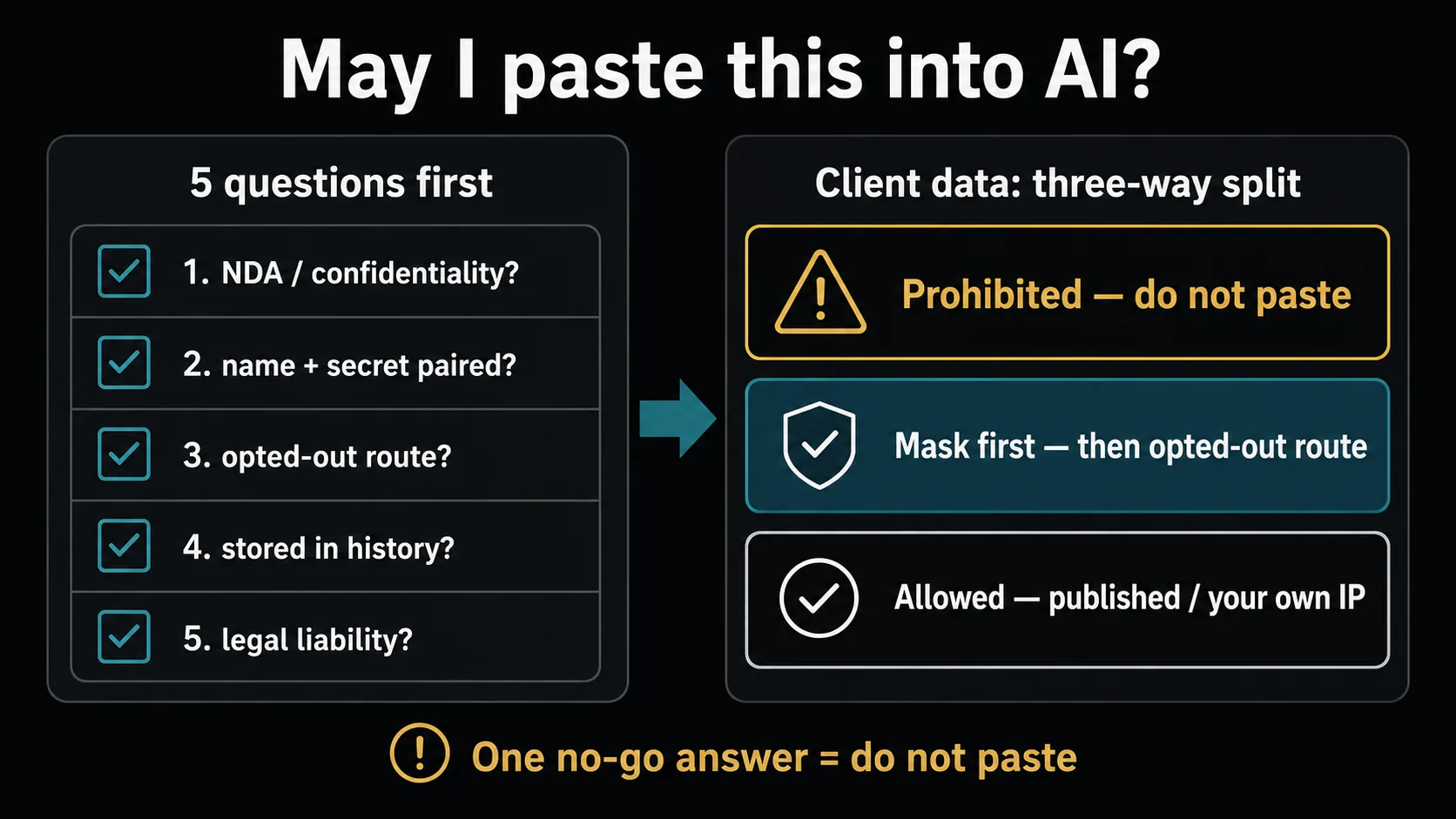
[Five questions before pasting into AI — one "no-go" answer means do not paste]
□ Is this information barred from external transmission by an NDA / confidentiality / contracting agreement?
□ Does it pair a client's or third party's name with confidential content (customer lists / deal values / bug details)?
□ Is the service opted out of training / under ZDR / an API route excluded from training?
□ Will the input persist in history, memory, or conversation titles? (use temporary modes for anything sensitive)
□ Would you or your organization bear legal liability if it leaked? (if yes — escalate to your manager / legal)
For client data, a three-way split speeds up the call:
| Category | Examples | Verdict |
|---|---|---|
| Prohibited | client name + confidential content (deal values / bug details / personal data) / unpublished spec documents verbatim / client-specific API keys inside code | Do not paste without explicit legal/security approval (contract and statutory violations can stack) |
| Mask first | technical architecture without the client name / code fragments with keys removed and identifiers renamed / error logs with IDs and IPs masked | OK after masking, via an opted-out / ZDR / API route. Masking = manual work plus a mechanical check, both |
| Allowed | published OSS code / published API specs / generic technical questions / code whose IP belongs to you by contract | OK (opt-out still recommended) |
Real incidents read well through this frame (all are actual cases per contemporary reporting or official statements; keep them distinct from the generalized lessons).
- Secrets pasted in: in 2023, multiple reports described Samsung's semiconductor division pasting internal source code into ChatGPT, leading to a company-wide ban. The lesson is not "don't use AI" but that rolling out tools without pre-defining "what may go in" produces accidents (the five questions and the three-way split are that pre-definition).
- Output accidents: in 2023, a US lawyer submitted non-existent cases generated by ChatGPT to a court and was sanctioned. In 2025, a major consultancy's report for the Australian government was found to contain AI-derived fabricated citations, leading to a partial refund. Human verification before redistributing outputs cannot be replaced by any setting (tier ②).
- Provider-side failure: in 2023, an OpenAI-side bug briefly exposed other users' conversation titles and parts of payment information (officially reported). Even with perfect settings on your side, provider-side incidents cannot be reduced to zero — limiting what you put in is the only self-defense.
What only enterprise contracts provide — and the US/EU drivers
For in-house adoption, tier ③ is what you verify before signing.
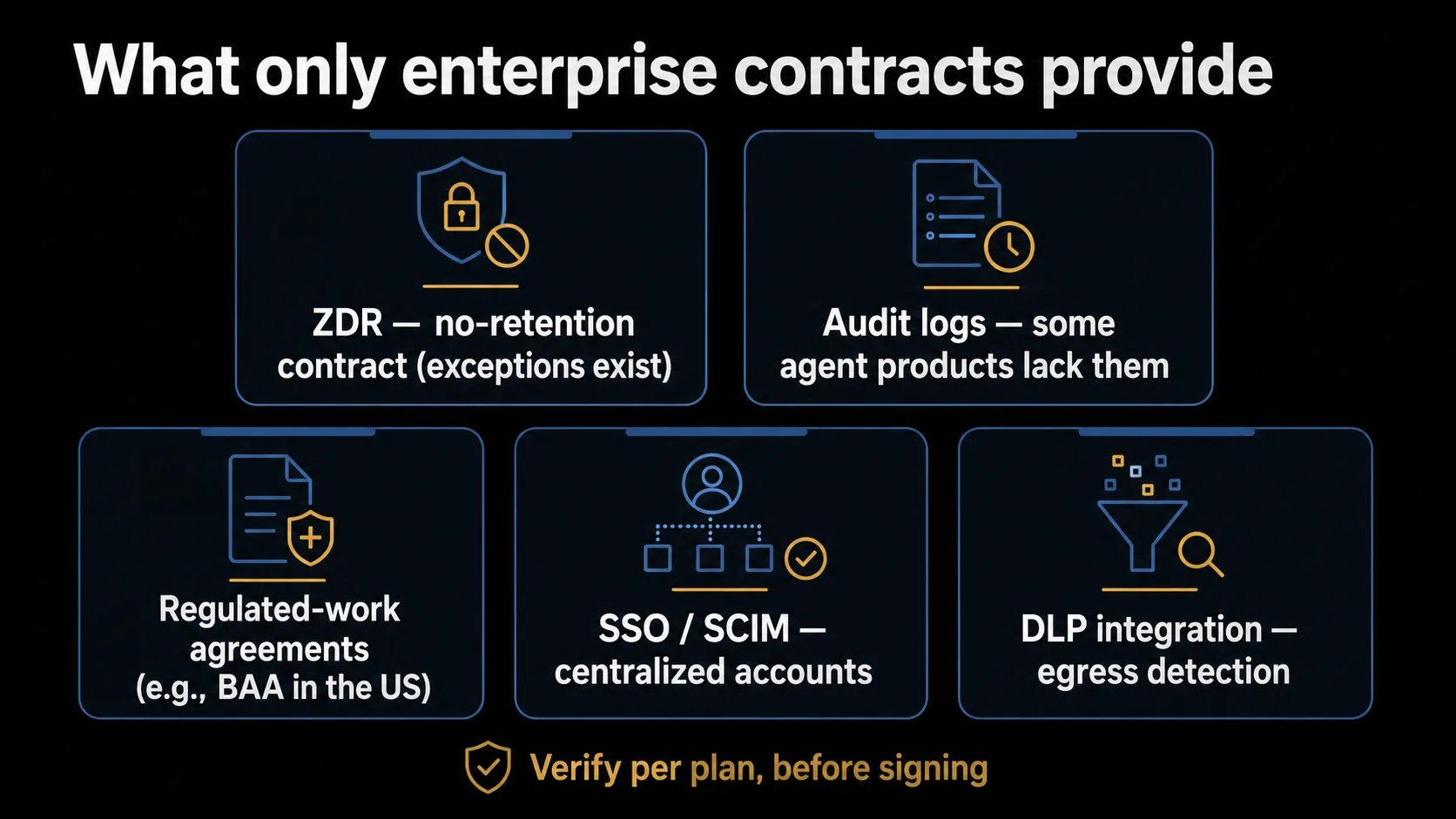
- ZDR: excludes in-scope inputs/outputs from ordinary storage. Not "zero without exception" — out-of-scope products/features/models and legal or abuse-related holds remain (each vendor publishes an applicability table). Normally requested through sales, not a toggle.
- Audit logs / compliance APIs: the "who did what, when" record, typically on upper enterprise tiers. Watch out: some newer agent products ship without audit logging (vendor docs at the time of writing explicitly exclude certain agent products from audit features). For regulated work (healthcare, finance, SOX), write the internal control rule "no audit log, no regulated use" first — a conservative internal policy, not in itself a legal mandate (whether vendor-side AI audit logs are legally required depends on your sector and regime).
- Regulated-work agreements: for US healthcare work under HIPAA you need a BAA (Business Associate Agreement) — and plan coverage differs. "It's an enterprise plan" is not enough; verify which plans are covered before contracting (at the time of writing, configurations exist where a mid-tier business plan is excluded). Outside the US, check your own jurisdiction's data-protection and outsourcing rules separately.
- SSO / SCIM / DLP integration: centralized account control and sensitive-data egress detection — the base that prevents orphaned accounts and per-individual configuration drift.
Why these exist is jurisdiction-driven. In the US, there is no single federal AI-privacy statute: the FTC's Section 5 authority polices whether privacy promises (like opt-outs) actually work as advertised, and state privacy laws (CCPA/CPRA and counterparts — around twenty states had comprehensive laws enacted as of this article's last check, with more enacted or taking effect since; the exact count keeps shifting, so see the IAPP tracker in the references) give residents opt-out and deletion rights. In the EU, where personal data processing is involved, several of this article's "settings" become rights-handling questions — objection to processing (Art. 21), erasure (Art. 17), access (Art. 15) — subject to legal bases, identity verification, and exceptions rather than automatic toggle-equivalents. The AI Act's transparency obligations (Art. 50, applying from 2026-08-02) add disclosure duties — chiefly on providers (telling users they are interacting with AI; machine-readable marking of AI-generated content), with some duties falling on deployers — again with stated exceptions. The practical consequence: the same service carries different legal weight depending on where your users sit — in an EU deployment, opt-out and deletion paths become a compliance matter, not a courtesy.
Summary — minimum checks for individuals and companies
AI service safety sorts into "enforced by settings (①) / per-use discipline (②) / enterprise contracts (③)." Copy the checklists:
[Minimum for personal plans (indie / side projects)]
□ Found and switched off chat-plan training defaults? (they can be on by default)
□ API keys in .env + .gitignore (never hardcoded)?
□ CLI agents kept on sandbox + approval + deny list (no daily use of skip-everything flags)?
□ Autonomous agents kept away from sensitive sites, logged-in sessions, production systems?
□ Sensitive conversations in temporary modes (history/memory-light, not true non-retention; don't rely on deletion)?
□ The five pre-input questions made a habit?

[Minimum for corporate adoption]
□ Regulated work identified first, and required guarantees (BAA where US healthcare applies / audit logs) confirmed per plan before contracting?
□ ZDR need determined (customer data / PII)? — sales-channel request is the norm
□ Internal rule written: no audit log, no regulated use (some agent products lack it)?
□ Training-default per plan verified by contract (business tiers are typically off by default — confirm)?
□ The five questions and the three-way split distributed as an internal checklist?
□ Centrally managed settings (admin-distributed deny lists etc.) in use?
Related: Reading AI Service Terms / Virtualization & Sandboxes / Communication Security, Layer by Layer
Sources / References
Last verified: 2026-06-11 / Jurisdiction: the settings framework is neutral; the drivers part of this edition is US/EU-focused (Japan is covered in the Japanese edition). Note: settings, plans, and defaults change frequently — use these as places to verify, and always check the current page before deciding.
Data usage and privacy (official)
- OpenAI — Data Controls FAQ / OpenAI — Enterprise privacy
- Anthropic — Privacy Center / Change model-improvement privacy settings (Help Improve Claude toggle, Privacy Center) / ZDR applicability (Privacy Center)
- OpenAI — API data usage / Anthropic — API and data retention
CLI and agent settings (official)
US/EU drivers (official)
- FTC — Section 5 enforcement (unfair or deceptive practices)
- IAPP — US State Privacy Legislation Tracker
- GDPR — Art. 15 / 17 / 21 (EUR-Lex consolidated text)
- EU AI Act — Regulation (EU) 2024/1689 (EUR-Lex)
Incidents (source type marked per item)
- (primary) OpenAI — March 20 ChatGPT incident (official report, 2023-03)
- (primary) OpenAI — Response to The New York Times' data demands (official statement on the litigation-hold order)
- (primary) NYT v. OpenAI — termination of the preservation order (ongoing preservation duty ended as of 2025-09-26, per the stipulated modification of 2025-10-09) — court order PDF
- (primary) Mata v. Avianca docket (CourtListener)
- (secondary) Samsung's generative-AI restrictions (Bloomberg / TechCrunch, May 2023) — TechCrunch 2023-05-02
- (secondary) Deloitte Australia's government report with AI-fabricated citations and partial refund — Fortune 2025-10-07
Settings screens, plan structures, defaults, and availability change. This article provides the verification frame (three tiers plus checklists); for individual settings and plan selection, verify against the primary sources and the latest official pages.
About the author
Over 20 years of electrical and software development at a major electronics manufacturer, starting from control engineering, plus about 10 years of independent development. I write from the fundamentals that "become risks if you don't know them," across hardware and software, corporate and personal — and plan to cover practical AI usage as well. More at About this blog.