
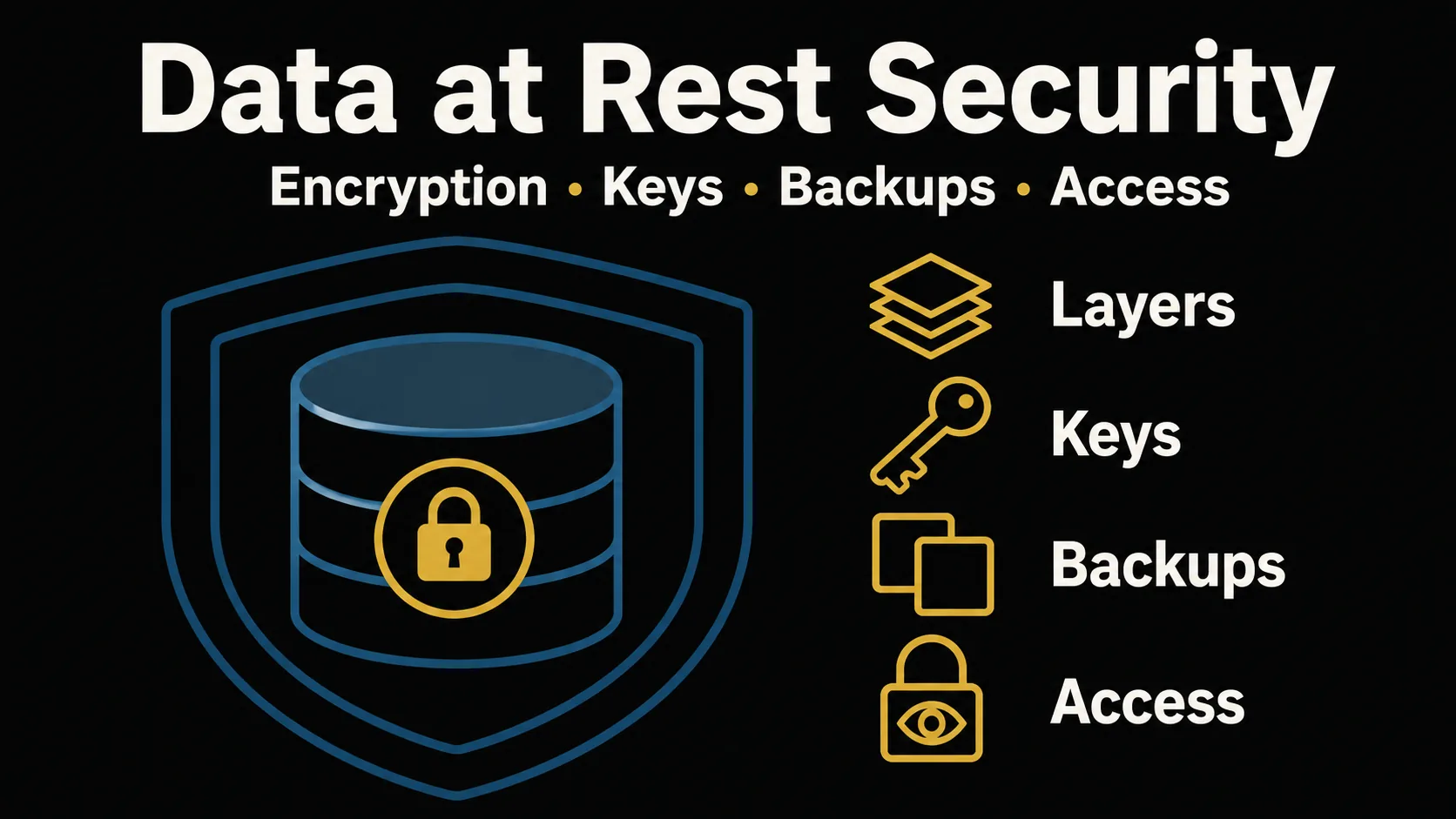
Key Points
- Core — Protecting data at rest is not a single switch. It is several decisions layered together: which layer you encrypt at, where you keep the keys, how you protect backups, and who is allowed to read the data. Reading it by "which threat, defended by what" — rather than memorizing tool names — shows you where the gaps in your own setup are.
- Who this is for — practitioners who place company or client data into a managed database or Software as a Service: software used over the network as a service rather than installed locally.See glossary → (Software as a Service) and need to review or design at-rest security, without being security specialists (for example, manufacturing IT). No prior knowledge required.
- Portable takeaway — the layer model (application / database-TDE / disk), envelope encryption and key ownership, and "encrypt backups and test the restore" hold regardless of jurisdiction. Where regions diverge is the regulatory driver, summarized below for the US and EU.
- Out of scope (a specialist, the official docs, or other posts) — encryption in transit (see communication security) / the details of authentication and authorization (see auth basics) / clause-by-clause legal reading / vendor product comparisons or audits of a specific environment.
Written: 2026-06 / Scope: the technical model is jurisdiction-neutral; the regulatory context below is framed for the US and the EU. / last_updated: 2026-06-28
This is educational material, not design or legal advice
This article is a general map for thinking about data-at-rest security. It is not design advice for a specific system or a substitute for a security audit, and it is not legal advice. Product names, service screens, standards, and regulations change over time — cloud key-management services in particular. Always confirm the actual design, implementation, procurement, and compliance decisions with your internal security / infrastructure team, qualified professionals, and the official, primary documentation. This information is provided "AS IS"; the author and YATA-NODE accept no liability for any loss arising from its use. Use at your own risk.
Where this sits in the series: this is the data-at-rest entry of the "understand the mechanism" series. Where communication security covered protecting data while it moves (in transit), this post gives a one-pass overview of protecting data while it sits (at rest). The two are a matched pair — you only close the gap when you have both. A Japanese edition (日本語版) of this article is also available.
Mini-glossary (for first-timers): the minimum you need for the terms that recur below.
- At rest / in transit — at rest means data "sitting" on a disk or in a database; in transit means data "moving" over the network. They need different defenses, so we treat them separately.
- Transparent Data Encryption: the database automatically encrypts its stored files; the app uses it with no code changes.See glossary → (Transparent Data Encryption) — the database automatically encrypts its stored files, and the application uses it with no code changes.
- Key Management Service: a managed service that stores, issues, and audits encryption keys (AWS KMS / Azure Key Vault / Google Cloud KMS).See glossary → (Key Management Service) — a managed service that stores, issues, and audits encryption keys (Amazon Web Services: a cloud provider that rents compute and managed services.See glossary → KMS / Azure Key Vault / Google Cloud KMS).
- Envelope encryption — a nested scheme where the key that encrypts your data is itself encrypted by another key, so you never store a key in the clear.
- Full-Disk Encryption: encrypts the entire disk so data stays unreadable if the device is lost or stolen.See glossary → (Full-Disk Encryption) — encrypts a whole disk so the data is unreadable if the disk is stolen or lost.
- Hardware Security Module: dedicated hardware that generates and holds keys and never lets them leave in plaintext.See glossary → (Hardware Security Module) — dedicated hardware that generates and holds keys and never lets them leave in plaintext.
"You should encrypt your data" is common advice, but the moment you try to apply it to your own system, the question becomes where and with what you actually encrypt. That doubt is sharpest for people reviewing security before they put company or client data into a cloud database or SaaS. This post breaks the jargon down and aligns everything to one lens — "which threat, defended by what" — to turn data-at-rest protection into a map. We walk it in order: ① separate at-rest from in-transit, ② choose the encryption layer, ③ decide where the keys live, ④ protect backups, and ⑤ tighten access. By the end, you can decide what to do first rather than memorize names.
Why regulators care (US and EU) — motivation, not legal advice
Encryption at rest is often driven by regulation, but the legal nature of each driver differs, and they should not be lumped together:
- US — state breach-notification laws (state law). Nearly every US state requires notifying individuals after a breach of personal data, and many provide an encryption safe harbor: if the exposed data was encrypted (and the key was not also exposed), notification may not be required. The exact wording and conditions vary by state.
- US — HIPAA (a sector-specific federal law). For protected health information, the HIPAA Security Rule treats encryption of data at rest as an "addressable" implementation specification: you must assess whether it is reasonable and appropriate, then either implement it, or — if not — document why and implement an equivalent alternative measure where reasonable and appropriate (45 CFR 164.312(a)(2)(iv); 164.306(d)). It is therefore not optional, but not a flat, universal mandate either. (A January 2025 HHS proposed rule would remove this "addressable" flexibility and make encryption a requirement; as of this writing it is not yet finalized, so confirm the current rule.)
- US — PCI DSS (an industry standard, not a law). For payment-card data, PCI DSS (Requirement 3) requires that stored cardholder data be rendered unreadable (for example, by strong cryptography). It is contractually enforced by the card brands, not legislated.
- EU — GDPR Article 32 (regulation). Art. 32(1)(a) lists "encryption of personal data" as an example of an appropriate technical measure ("inter alia, as appropriate") — it is risk-based guidance, not a blanket requirement to encrypt everything.
The takeaway: encryption is a widely recognized control, but whether and how it is required depends on which regime applies to you. Treat this as motivation to act, and confirm specifics against the primary text and your counsel. Primary sources are listed in the References.
Data at rest vs. in transit — what encryption actually covers
The first stumble is usually the thought, "I serve everything over HTTPS, so my data is already safe, right?" HTTPS protects data only while it is flowing between the browser and the server (in transit). Once the data reaches the server and is written to a disk or database — once it is sitting there (at rest) — it needs a different defense. Encryption in transit is "sealing the package you're shipping"; encryption at rest is "putting the delivered package in a safe." A strong seal does nothing if there is no safe at the destination.
The two defend against different threats. Encryption in transit (Transport Layer Security: encrypts traffic; what `https://` relies on.See glossary →, Transport Layer Security — the mechanism behind https://) stops eavesdropping and tampering along the path. Encryption at rest stops threats where the data is carried off by the media or the file itself: a stolen or lost disk or storage medium, an intruder copying whole Database: a system for storing, searching, and managing data.See glossary → files off the server, or a leaked backup tape. (How far each encryption layer actually protects you differs — the next section's table sorts that out.) What encryption at rest does not stop is someone who reads the data through a legitimate login or a stolen DB connection — that is closed later by access control (section ⑤). Either defense alone leaves a gap, so the baseline is to have both. The in-transit mechanics live in communication security; this post stays on data at rest.
One more distinction: hardening the network with firewalls or zero trust is also a separate matter from encrypting stored data. A network boundary controls who gets inside, but it does not protect against an authorized party already inside, or against media carried off wholesale. If boundaries are your concern, see enterprise networks as well. Here we treat at-rest security as the last layer that still protects the data itself even when the boundary is bypassed.
Which layer to encrypt — application, database (TDE), or disk
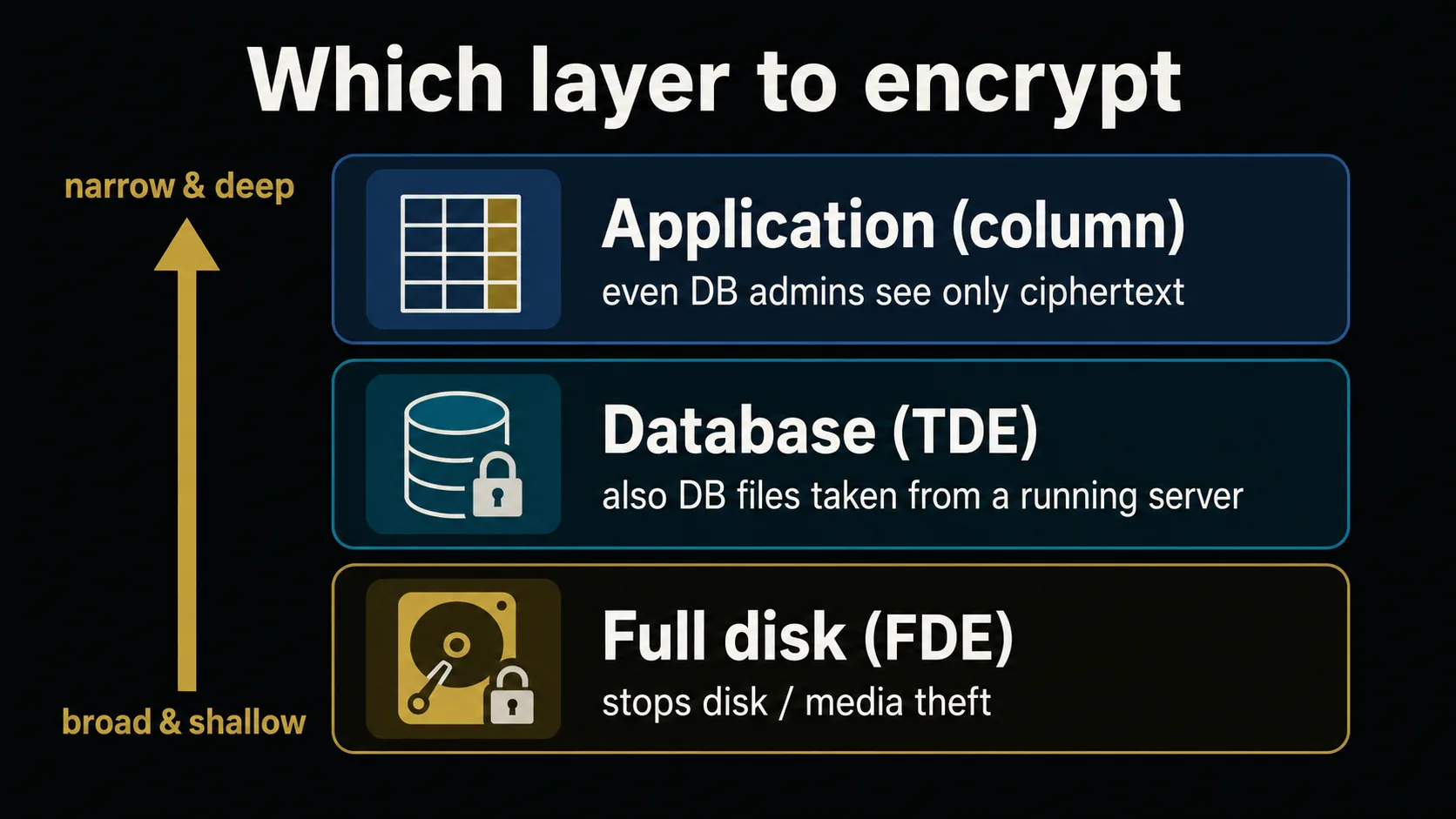
At-rest encryption is typically applied at one of three layers. From the bottom up: FDE, which encrypts the entire disk; TDE, where the database automatically encrypts its stored files; and application-layer encryption, where the app encrypts specific fields (columns) before storing them. Most introductions list these three as "types" and stop there — but what you actually want to know is "which one should I choose." The key to choosing is knowing which threats each layer stops, and which it is powerless against.
| Encryption layer | Disk / media theft or loss | DB file taken from a running server | Abuse of DB credentials (direct SQL) | Leak via an app vulnerability |
|---|---|---|---|---|
| Full disk (FDE) | ✓ | ✗ (decrypted while running) | ✗ | ✗ |
| Database (TDE) | ✓ | ✓ | ✗ | ✗ |
| Application (column) | ✓ | ✓ | ✓ (encrypted fields only) | △ |
(✓ = protects, ✗ = does not, △ = partial.) This table assumes the encryption keys and the running server's execution privileges have not themselves been taken. If the keys or root are stolen, any layer can fall. The protection ranges in this table are the author's synthesis based on the official at-rest encryption docs from AWS and Microsoft (see References) — a conceptual model, not a guarantee for any specific product.
The table reads simply: lower layers are easier to apply and broad but shallow, while higher layers take more effort but reach deeper threats. FDE helps when the whole disk is stolen, but while the server is running the disk is decrypted, so an intruder who copies files is unaffected. TDE keeps the stored files encrypted, so even on a running server the exfiltrated DB files are unreadable. But TDE has a trap: to anyone with legitimate DB connection privileges (a compromised internal account, or an attacker issuing SQL directly), the database decrypts and returns results, so it offers no protection. "We turned on TDE, so we're safe" is the misconception born right here.
The deepest reach belongs to application-layer encryption. Because the app encrypts before storing, even a DB administrator or anyone connecting directly to the database sees only ciphertext for those fields. The cost is that you choose which fields to encrypt yourself, and — because the app holds the key — it falls if the app itself is compromised. This assumes the key is held outside the database; if the implementation keeps the key inside the DB or passes it to a DB-side decryption function, a stolen DB connection can still reach the key or the plaintext, and this advantage is lost.
A practical rule of thumb: first lay down FDE or TDE as a foundation (often on by default in managed cloud databases) to cover disk theft and DB-file exfiltration. Then layer application-level encryption over only the fields you most want hidden — personal data, credentials, payment details. Encrypting every column at the app layer makes search and operations much heavier, so scoping what you protect is the realistic move. Remember it as "broad and shallow" at the lower layers, "narrow and deep" at the upper one.
Where to keep your keys — from hardcoding to KMS and envelope encryption
Encryption's strength comes less from the cipher than from how you protect the key. A sturdy safe is pointless if the key is taped to the door. And the most common accident is hardcoding a key or connection password into the code and committing it straight to a public git repository. The realistic approach is to raise key management in stages as you grow.
Stage 1 (everyone starts here). Keep keys and secrets out of the code. Move them into environment variables, exclude the .env file that holds the values from tracking via .gitignore, and commit only a .env.example (a template with key names but no values) to share with the team. This alone sharply reduces the most common accident — pushing a key to git.
Stage 2 (as a team or production comes into view). Environment variables are handy but poor at recording who accessed a key and when, and at rotating keys. So you hand the keys to a KMS (a cloud key-management service): the app uses its own identity (IAM, for example) to ask the KMS — only when needed — to encrypt, decrypt, or issue a data key. The master key itself is never taken out of the KMS/HSM. You no longer store a key in plaintext in the app's config, and access is logged.
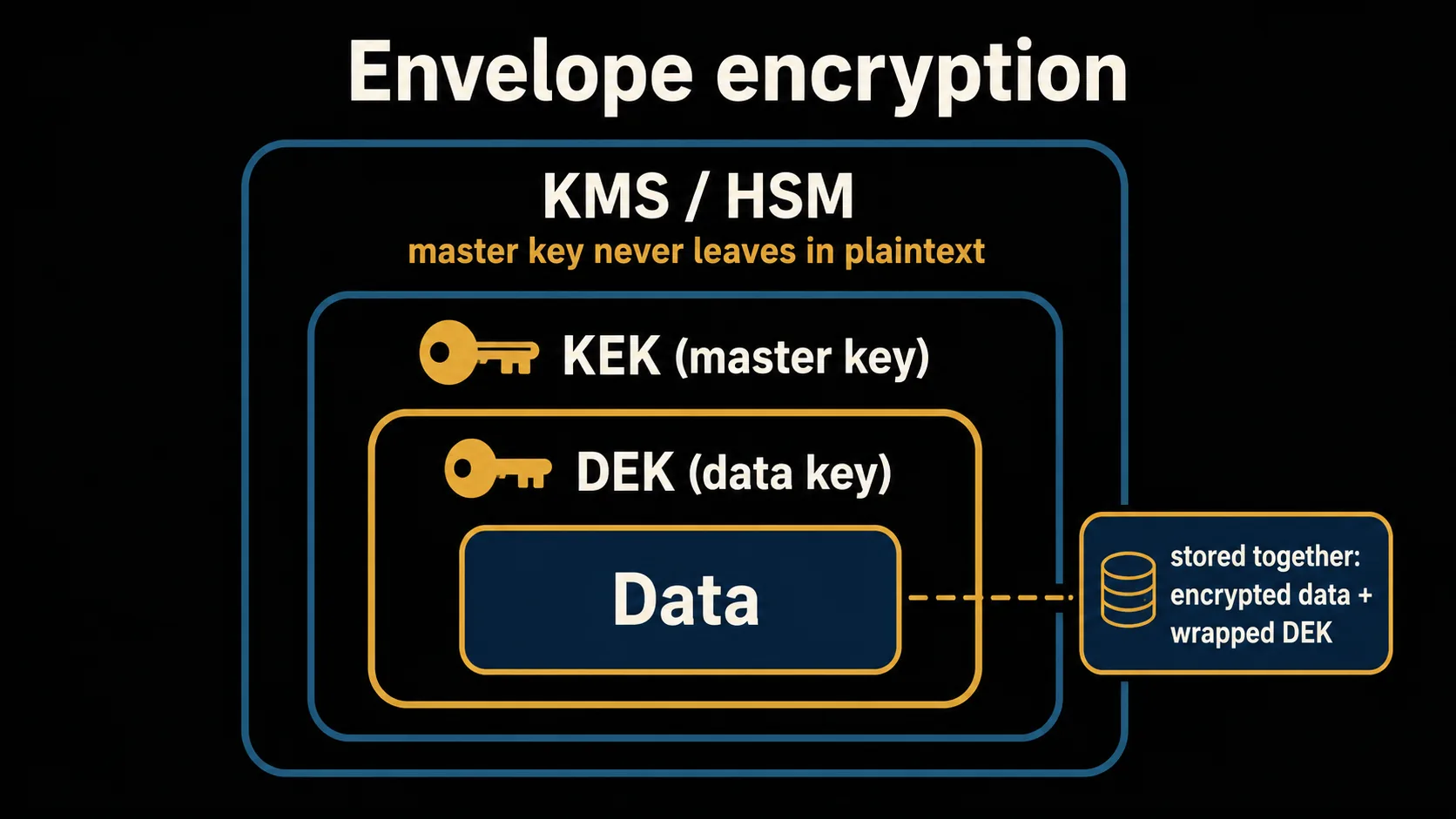
Stage 3 (when you want to rotate keys cleanly). This is where envelope encryption pays off. The structure is nested: you encrypt the data with a Data Encryption Key (DEK), then encrypt that DEK with a higher-level Key Encryption Key (KEK — the master key the KMS holds), and store only the encrypted DEK next to the data. That way you never keep a plaintext key sitting naked on disk (in a config file or beside the data). The key is used only momentarily at decryption time, and the upper KEK is never exported in plaintext from the KMS/HSM — meaning you don't persist a naked key. Rotation also gets easier: swap the upper KEK and you only re-wrap the encrypted DEK, so you rotate the key without re-encrypting all of the underlying data. Note that this re-wrap is something you (or your system) perform; a key management service's automatic key rotation only provisions new key material and does not re-encrypt existing data or re-wrap existing DEKs (older data stays decryptable with the old key).
Who owns the key is its own decision. Cloud KMSs generally distinguish a provider-managed key (the provider generates and controls the key material) from a customer-managed key (you create and control the key inside the KMS, though the service still generates the material), with a further step of importing your own key material — "bring your own key" (BYOK) — where you supply the key material itself. BYOK is an option when key residency or a specific compliance requirement applies, but it adds the responsibility of managing that material yourself. Terminology differs across vendors (AWS, for example, separates AWS owned / AWS managed / customer-managed / imported-material keys), so confirm each vendor's exact terms at implementation time. Starting with a managed key and considering imported key material only when a need arises is perfectly sufficient.
Encrypt your backups too — and test the restore
Backups are the easy thing to overlook. Even if your production DB is encrypted, the defense collapses if its backup sits in plaintext in some other storage. For an attacker, a soft backup is an easier target than hardened production. Bring snapshots, dumps, scheduled exports, and the destinations you ship to external storage into the same encryption scope as production.
A widely known guideline for where to keep copies is the "3-2-1" approach: keep 3 copies of the data, on 2 different kinds of media, with 1 of them off-site. The point is dispersion so that a single failure or a ransomware hit does not wipe out everything at once. Tied to this article's theme, the premise is that every one of those copies is encrypted.
And the most important thing about an encrypted backup is the restore test. An encrypted backup that you cannot decrypt is just an unreadable file; lose the key and even you can never get it back. The goal of a backup is not "it was taken" but "it can be restored," so build a routine that actually restores it periodically. While you are at it, confirm that the key used to decrypt the backup is not stored in the same place as the backup itself — separate them so that losing the key, or having the backup stolen, does not break everything at once.
Who can read what — access control for stored data
Encryption was the layer for "even if the media or files are carried off, they can't be read." But it cannot stop someone reading the contents through a legitimate login or a legitimate DB connection. Access control closes that gap — the last piece that complements encryption.
The basis is least privilege. Give each DB account used by an app or staff member only the scope it needs: an account that only reads gets read-only; one that touches a single business area is limited to the relevant tables. Going further, mechanisms that restrict visibility at the row or column level within the same table (such as Row-Level Security, RLS) let you enforce things like "this user sees only the rows for the clients they handle."
The easy thing to miss is leaks through legitimate features. Check that admin-panel listings, CSV exports, and error-time logs or stack traces are not exposing personal data as-is. Review whether a column you encrypted is nonetheless designed so that administrators can read it in plaintext. Drawing these "who sees what" lines is the work of authentication and authorization itself. The deep dive lives in auth basics, but remember: protecting data at rest only closes once access control is included.
Conclusion
Protecting data at rest is not one setting — it is five decisions layered together: ① separate at-rest from in-transit scope, ② choose the encryption layer (app / DB / disk) according to the threat, ③ keep keys out of the code and raise them in stages toward KMS and envelope encryption, ④ encrypt backups too and run restore tests, and ⑤ tighten access control to stop leaks through legitimate paths. With this map, when you meet a new product name or technique you can place it: "which layer is this about?"
To close, here is a checklist for reviewing your own setup. Copy it and check whether you can explain each item — and whether it is actually done.
【Data-at-rest checklist】
□ Beyond in-transit (TLS), is data also encrypted at rest?
□ Can you explain which layer (app / DB / disk) you encrypt at?
□ Are you relying on TDE alone and overlooking reads via legitimate DB credentials?
□ Are the most sensitive fields (personal data, credentials) layered with app-level encryption?
□ Are keys and connection secrets kept out of the code (.env in .gitignore)?
□ Are keys held in a managed place (KMS) instead of plaintext config files?
□ Are backups — not just production — encrypted?
□ Have you ever actually restored an encrypted backup?
□ Are DB accounts least-privilege? Do exports or logs leak personal data?
If any item is "can't explain / not done," that is your next thing to work on. You do not need everything perfect at once. Start from the foundation of encryption, then key management, backups, and access control — closing the gaps one layer at a time.
References
Public / primary sources (backing the technical model; product names and steps change, so confirm the latest in each official source before relying on it):
- GDPR (EU General Data Protection Regulation) Article 32 (security of processing) https://eur-lex.europa.eu/eli/reg/2016/679/oj — lists encryption as an example of an appropriate technical measure ("inter alia, as appropriate").
- NIST SP 800-57 Part 1 Rev. 5, "Recommendation for Key Management" https://csrc.nist.gov/pubs/sp/800/57/pt1/r5/final — international guidance on key management.
- NIST SP 800-111, "Guide to Storage Encryption Technologies for End User Devices" https://csrc.nist.gov/pubs/sp/800/111/final — storage-encryption background.
- HHS, HIPAA Security Rule https://www.hhs.gov/hipaa/for-professionals/security/index.html — encryption at rest as an "addressable" specification (US sector-specific federal law).
- PCI Security Standards Council, PCI DSS https://www.pcisecuritystandards.org/ — render stored cardholder data unreadable (an industry standard, contractually enforced).
- California Civil Code §1798.82 https://leginfo.legislature.ca.gov/faces/codes_displaySection.xhtml?sectionNum=1798.82.&lawCode=CIV — a representative primary state statute: breach notification is not triggered where the personal information was encrypted and the encryption key or security credential was not also acquired.
- NCSL, "Security Breach Notification Laws" https://www.ncsl.org/technology-and-communication/security-breach-notification-laws — a state-by-state index (secondary compilation) of US state laws, many with an encryption safe harbor.
- CISA, "Back Up Business Data" https://www.cisa.gov/audiences/small-and-medium-businesses/secure-your-business/back-up-business-data — public statement of the backup "3-2-1" principle (3 copies, 2 media, 1 off-site).
- AWS, "Data encryption (prescriptive guidance)" https://docs.aws.amazon.com/prescriptive-guidance/latest/strategy-data-at-rest-encryption/about-data-encryption.html and AWS KMS Developer Guide (envelope encryption) https://docs.aws.amazon.com/kms/latest/developerguide/concepts.html.
- AWS KMS Developer Guide, "Rotating AWS KMS keys" https://docs.aws.amazon.com/kms/latest/developerguide/rotate-keys.html — primary basis that automatic key rotation does not re-encrypt existing data or re-wrap existing DEKs.
- Microsoft Learn, "Data encryption at rest" https://learn.microsoft.com/en-us/azure/security/fundamentals/encryption-atrest.